
Building a Club Web Site
by Bill Bilautas
IN THE OLD DAYS, getting involved in the hobby meant a leisurely stop by the local hobby shop. There people would find helpful experts, beautiful models hanging from the ceiling, and all the latest hot gadgets under the display counter. It was the local hotbed of activity where anyone could join in the fun and find out how to get more involved.
Today the aeromodeling community is adapting to the new information age. Thanks to the Internet, people are used to surfing the information superhighway because it's fast and convenient. Everything a hobbyist needs to know is just a click away.
To get these people out to the flying site, they need to know about the clubs in their area. A club Web site is a means of distributing information about the organization to the membership and to the public. Newsletters, club rosters, photo albums, plans, movies, and other information are made readily available on a Web page.
I have talked to other clubs' members who receive their club newsletters and other correspondence solely via the Internet. That helps save the cost of postage and paper. Of course that distribution system only works if the club's members have an Internet connection.
In some cases this may mean a trip to the local library or to a fellow club member's house if you don't have Internet access at home. The Internet is also available at many public libraries.
This article will describe some options for how to structure a club Web site. It will include information about how to have your newly created site appear on the Internet for the world to see.
I belong to the Checkerboard Field R/C Club in Maywood, Illinois, and maintain the club Web page in addition to editing the club newsletter: The Checkerboard Flyer. Our site is www.checkerboardrc.org. Please visit us soon.
Site Content
One of the first challenges in designing a Web site is to determine what will be posted to it. Some information will be there for club members and other information will be for the public. We have had new members join the Checkerboard club after visiting our page to learn about us. The following are pages on our Web site and their purposes. As you read, you may decide to include similar information or choose different items for your site.
Home
This is the page where visitors arrive when they type your club's Web site address into a browser. Create a site address that is as close to your club's name as possible; that will help those who are looking for your Web page find it more easily via Internet search engines. This address is known as a Uniform Resource Locator, or URL.
Your home page is your opportunity to make a good first impression. As the saying goes, you only get one chance to do that.
I use the Checkerboard club's home page to disseminate important information to club members. The home page should contain the most important headlines and should feature links to other pages on the site that visitors might want to view, as follows.
- "About Us": For visitors who want to learn about your club, this section is the first place they should look. It could contain club contact information, directions to the field, and the history of your club. Checkerboard Field was once a U.S. Post Office airmail field, and it has been established that Charles Lindbergh landed on or near it. We also include information about membership size, scheduled activities, and the fact that we have flight trainers available. This information is important to someone who is looking to join a club. Flight instruction is usually a high priority for newcomers.
- "AMA": We provide a link to the AMA Web site, and in turn AMA provides a link to our Web site. You will need to contact AMA Club Secretary Lois Pierce (loisp@modelaircraft.org) to notify her that your site is up and running and request a link. She will check to make sure your site contains an AMA link and will post a link on the AMA Web page to your club site.
AMA provides a mechanism on its site to help people find clubs in their area (http://modelaircraft.org/clubs/search.aspx). It works well and provides another way for people to link to your site to learn about you.
- "AMA District VI": We provide a link to the District VI Web site. All AMA districts have their own Web pages. If you haven’t visited your district site, you really should. It will probably contain good information about events and news in your area.
- "Calendar": We print our club calendar in each issue of the club newsletter, but people misplace their newsletters and it is nice to view the calendar online. It is also easier to make changes to a Web-based calendar because there is no printing or postage involved and the changes take place immediately.
- "Club Roster": Club members like to call one another or mail cards to fellow members, so it is nice for each member to have a current copy of the membership roster. Making this information available on the Internet presents a privacy risk; you have probably heard about identity theft. No one wants to be a victim, so we make the Checkerboard club roster available only to club members.
When someone clicks on the "Club Roster" link on our site, a box pops up and the visitor is directed to enter a password. Only club members have the password. If visitors do not enter the correct password, they go no further and will not be able to view or download the club roster. When club members type in the correct password, they are taken to another page where they can download the member list.
- "Fly Market": Club members occasionally have items they would like to sell. The Fly Market is the place to post ads about hobby-related items that are for sale privately. Anyone who visits the club Web site can access this section.
- "Join": Our membership application can be downloaded from our Web site. It includes information about the membership dues structure. After a certain point in the year the fees go down. We also have a greatly reduced fee for junior members. The application includes the address where the completed form is sent. We have had several new members join this way because it’s quick and convenient.
- "Map": Our site features a downloadable map to the flying field. I am still amazed by the number of people who join the club and say that even though they live nearby, they never knew there was a model-airplane flying field so close. We have also had people visiting relatives in the area who found the field using our map.
- "Members E-mail": This list is available to visitors to our site, with an important exception. There are things called "spambots," which are software applications that travel the Internet to "harvest" legitimate e-mail addresses. Their purpose is to develop mailing lists of people to which to send spam (unwanted e-mail).
Some Web site-creation software allows authors to encrypt e-mail addresses to make them unreadable to spambots. This is an important part of identity security. We want our club members’ e-mail addresses available to other club members and the public, excluding spambots.
If you visit our site and move your mouse over any of the e-mail addresses on the members’ e-mail page, you will notice gibberish at the bottom of the page. This is what the e-mail addresses look like after being encrypted.
- "Movies": In the past few years high-speed Internet connections have been made available to home users. Services such as DSL (Digital Subscriber Line) and cable Internet are fast, affordable, and widely available. Although you may never have thought of downloading a 10-megabyte file using a dial-up connection, with a high-speed connection it is no longer a problem.
The movies available on the Checkerboard site are of club events. A special gathering is the January 1 breakfast/first flight of the year. We have movies posted of these flights for the past three years.
At each club meeting we have time devoted to Show & Tell, when modelers stand in front of the membership with their latest creations and talk about the experience of building and flying the models. We have movies of these sessions. We recently posted a movie of our Ribbon Cut Fun Fly. We also have a few movies under the topic of "Safety" that share serious problems members have had.
The topic of how to format movies for distribution on the Internet is the subject for a separate article. The process involves using a digital camcorder to capture video, importing the video onto a computer's hard drive with appropriate cables, and using software to edit the video.
That type of software is referred to as NLE, or non-linear editing. That means you can move clips into a different order, trim them, change their characteristics (sound levels, speed, etc.), add titles and special effects, and do many more things to make a good movie.
Then you change the movie into a file that can be uploaded to a Web server and viewed by those who visit your site. Movies add a dimension to your club page; they make it more interesting than simply posting static information.
- "Newsletters": Our club still mails out the monthly hard-copy newsletter; many of our members do not use the Internet. Receiving a club's publication via e-mail or downloading it from the club Web site is a way to save money.
The other benefit of having newsletters available on the club Web page is that members, or anyone else, can go back years to look for a particular article or issue. In addition to having links to previous newsletters, our club lists topics covered in each issue. That way it is easier to find the issue you are looking for.
- "Photo Albums": We have thousands of club pictures on our Web site. They are of club events, pilot projects, fun-flys, and more. The pictures capture model airplanes, hamburgers cooking, and new engines, but, more important, they capture fun times, good friends, and great memories.
I remember many years of taking pictures at the field, having them developed, looking at them, and then putting them away, not to be seen again for a long time. The Internet allows you to post all those pictures for your friends and everyone else to see.
The new digital cameras make the process easier. You can take pictures with film cameras, scan them, and then post them to the Internet, but it is a cumbersome process. Digital cameras allow you to quickly import pictures to your computer and then upload them to your Web site. Almost any modern computer will feature a high-quality display that will show all the beautiful detail and color that digital cameras provide.
- "Site Update History": In time your club Web site will grow. Changes will be made; new sections will be added and others deleted.
As the person who maintains the Checkerboard club's Web page, I like to have a history of what I have done with the site throughout the years and I like to view such history when I visit other sites. It is nice to see how a site was expanded and what the priorities were in the process.
- "Weather": Before leaving for the field for a flying session, what important thing do you check? The weather. Many club Web sites have direct links from their home pages to weather sites with their geographic area preselected. I added a weather link to our site, and it is a great feature for my money.
I found the link in MA several months ago.
Site Creation
I assure you that if you are reading this article and you have basic computer skills, you will be able to create and maintain a Web site on the Internet. It is really not difficult.
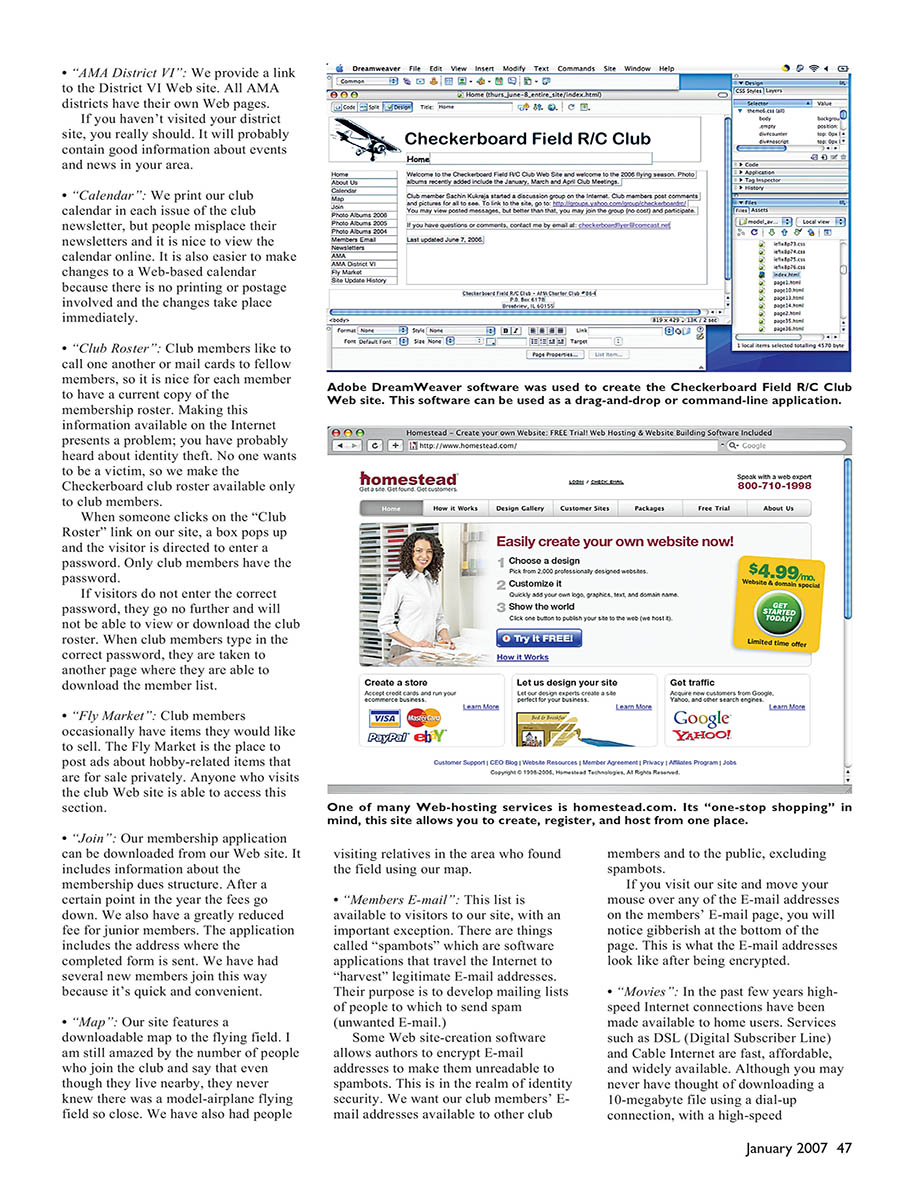
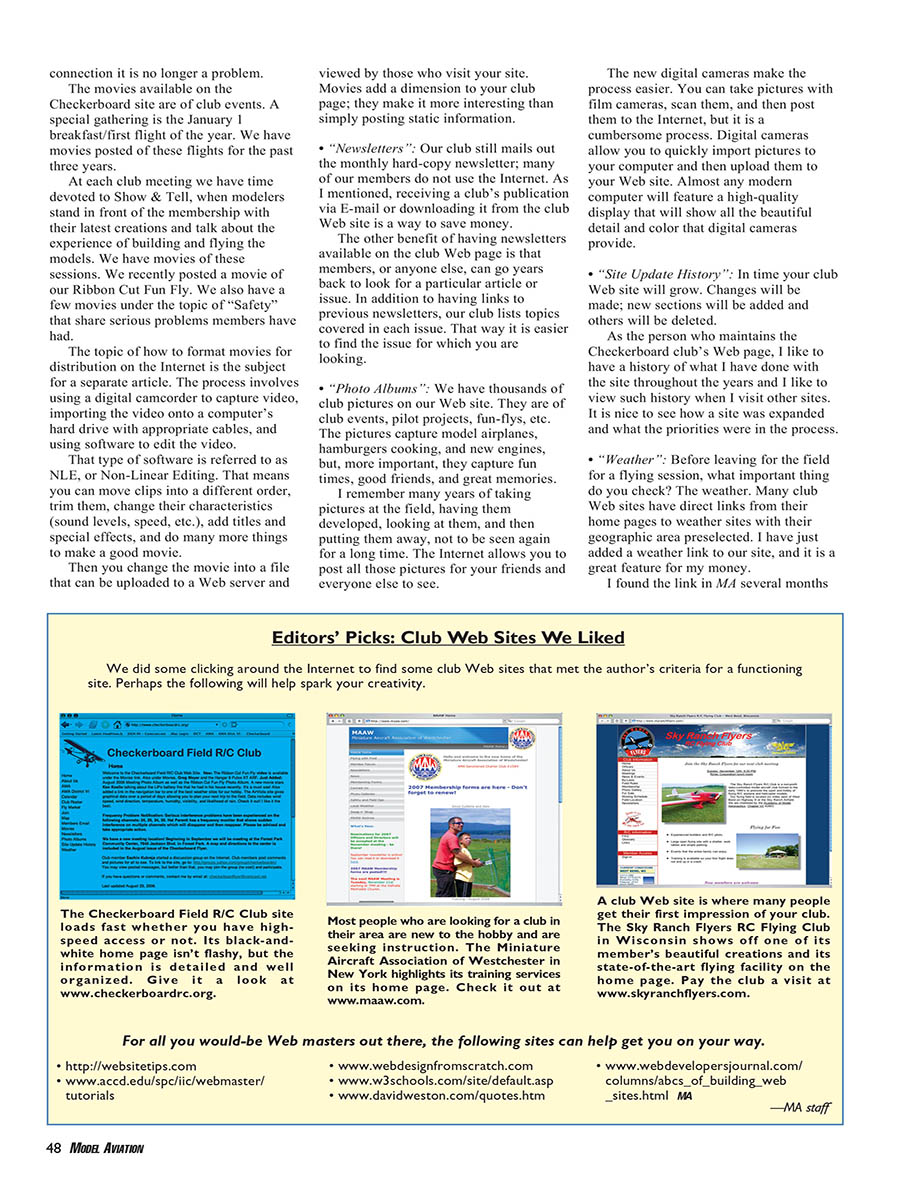
Many Web-hosting services, or Internet Service Providers (ISPs), walk you through the process of getting a site up and running. A company that impresses me is Homestead (www.homestead.com). It is an all-in-one solution and can provide you with everything you need to get a Web site online.
Homestead offers a gallery of professionally designed Web sites you can modify to suit your needs. It offers SiteBuilder software as part of the service you use to update text, images, logos, and more. You upload your site with a simple mouse click on the upload button (there is no need for knowledge of FTP—File Transfer Protocol—software). Homestead offers prompt technical support, and the company provides more sophisticated options to meet your needs after you have mastered the basics.
Homestead will also help with your domain name, which is the address where people reach your Web site. Our club domain name is checkerboardrc.org.
If you visit the Homestead site, you have an option to view the design gallery and take a free trial. It won't cost you anything. I advise you to visit this site and get familiar with options and terminology. You can even begin building your site to get a feel for the process.
If you would like to learn what else is available, do a Google search for "Web site creation software" or "Web site wizard" and that will bring up plenty of options. Keep searching until you find a hosting service that meets your needs.
After you have located an ISP you feel comfortable with, you need to create the Web site. You don't have to be a designer to make an attractive, functional site. Following are several rules I use to ensure a good visitor experience.
Three-Links Rule
A visitor to your site should be able to get to any information by clicking three links or less. If a visitor wants to see the October 2004 club newsletter, he or she should not need to click more than three times to get there. This rule helps ensure that visitors can quickly access the information they want.
Fifteen-Second Rule
Web pages need to load in 15 seconds or less. Years ago many of us connected to the Internet using modems. Compared to today's DSL and cable connections, modems are slow.
If your pages contain only text, the 15-Second Rule is usually easy to meet. Pages take longer to load when photographs and other graphics are added.
I chose 15 seconds as an arbitrary number when I was visiting sites using a modem connection. I began noticing how long pages took to load and decided that 15 seconds was my threshold of patience. After 15 seconds I decided it was not worth the wait and clicked to another site. The first site lost one visitor.
You can choose a different threshold (10 seconds, 30 seconds); the point is to have a design goal in mind. Test every page in your site to see if some take an extremely long time to load. If so, do something about it to improve your visitors' experience.
It is important to remember that even with DSL and cable connections, it is possible to create Web pages that load slowly. I'll discuss a solution to that problem below under the Optimize Images Rule.
Navigation Rule
Create a simple, consistent navigation system. Navigation in a Web site is a list of links you provide to take a visitor to other pages within your site. The device used to do this is usually called a navigation bar or navigation menu. It typically takes the shape of a column of links along one side of the page or a row of links along the top.
A visitor may enter your site on your home page and then click the calendar link to arrive at that page. There the visitor has the option of seeing other pages on your site. The Navigation Rule is that no matter what page a visitor views on your site, the same navigation choices should be available.
You may have visited a Web site where after clicking a link you arrive at a page that has no links or a different set of links from those on the previous page. It may result in one of those "You can't get there from here!" moments.
You want your visitors to always have the option of quickly viewing any page in your site. A simple, consistent navigation system provides that. (It is true that the visitor can click the "Back" button in the browser, but its intent is not for use in site navigation.)
Optimize Images Rule
Make images load quickly by optimizing them. Digital cameras are wonderful devices. They can produce fabulous images with deep, rich colors. On a Web site dedicated to model airplanes, photographs should be plentiful.
However, digital pictures can have enormous file sizes. A 2-megapixel camera can produce images greater than 1 MB in size. That is huge for a Web page and will take a long time to download for many visitors.
Use image-editing software to reduce the size of images. I use Adobe Photoshop, but many other programs will do the job. When saving for the Web, reduce the dimensions and set the quality to something reasonable—60 to 80 percent. Also use the JPEG format for photographs and GIF or PNG for graphics or logos.
If your hosting service allows it, create thumbnail images and link them to the full-sized images. That way your visitors can quickly scan a gallery of images and choose which ones they want to view in full resolution. Consider offering both small and large versions of pictures.
Another trick is to break long pages into smaller pages so that the visitor can view content incrementally. Use pagination for long photo galleries.
In Web design, the problem with those beautiful photographs is that they may take longer to load. Photographs that come straight from the camera typically have much more detail than can be presented on a computer screen.
The secret of photographs on Web pages is optimization. Optimization lets an image load on a Web page more quickly while still appearing to be of high quality.
The benefit to you as a Web site designer is that since each optimized photograph will load faster, you can put more pictures on the page. Homestead has a button on its SiteBuilder software that you simply click to optimize your photos and other images.
Site-Update Rule
Update your site content regularly. Once a month is a good starting goal.
Suppose your club newsletter editor sent out the January issue and then sent out the exact same newsletter in February except for changing the month. Club members would be unhappy because they would expect new content. The same belief holds with the club Web site.
You may update more or less often than once a month, but do it regularly—whatever that means for your club. Put a note on the home page indicating when the site was last updated. That way club members and visitors know the content is current.
Content-Organization Rule
Find a way to organize the content for your site. It will make your job as Web designer easier.
Our club Web site has thousands of photographs on various pages. When I began taking pictures for the site I would name each image to include the person (or people) in the photograph. If it were a photograph of a model, the name would include the builder's name in shorthand form (jsmith_aero_master.jpg). That organizational technique lasted roughly a year. It was extremely labor intensive.
For organizing pictures it is much easier to purchase photo-album software. There are two I recommend; which one you choose will depend on your computer platform.
If you use a Windows computer, Adobe Premiere Elements is a good, low-cost choice. If you use a newer Macintosh computer, the system will come with a program called iPhoto. Both are digital photo albums that allow you to sort and arrange photos in various ways. They even provide basic photo-editing capability.
Now I organize by events. All pictures taken at the November club meeting go into a digital album named "November 2006 Club Meeting." This system has worked well for me despite the fact that I need to manage thousands of photographs.
Focus Rule
A Web site should have one clear purpose. Once I visited a site whose designer was involved in RC and was a plumber by trade. There was information about both topics scattered throughout the site. It was confusing; don't do this. Instead, create two separate sites: one for modeling and another for plumbing.
This idea extends to individual Web pages. If a page is called "Calendar," a visitor wouldn't expect to find items for sale there. Additional Web pages in your site typically don't cost more, so create as many as you need to allow each to have a clear purpose.
Visit Other Sites Rule
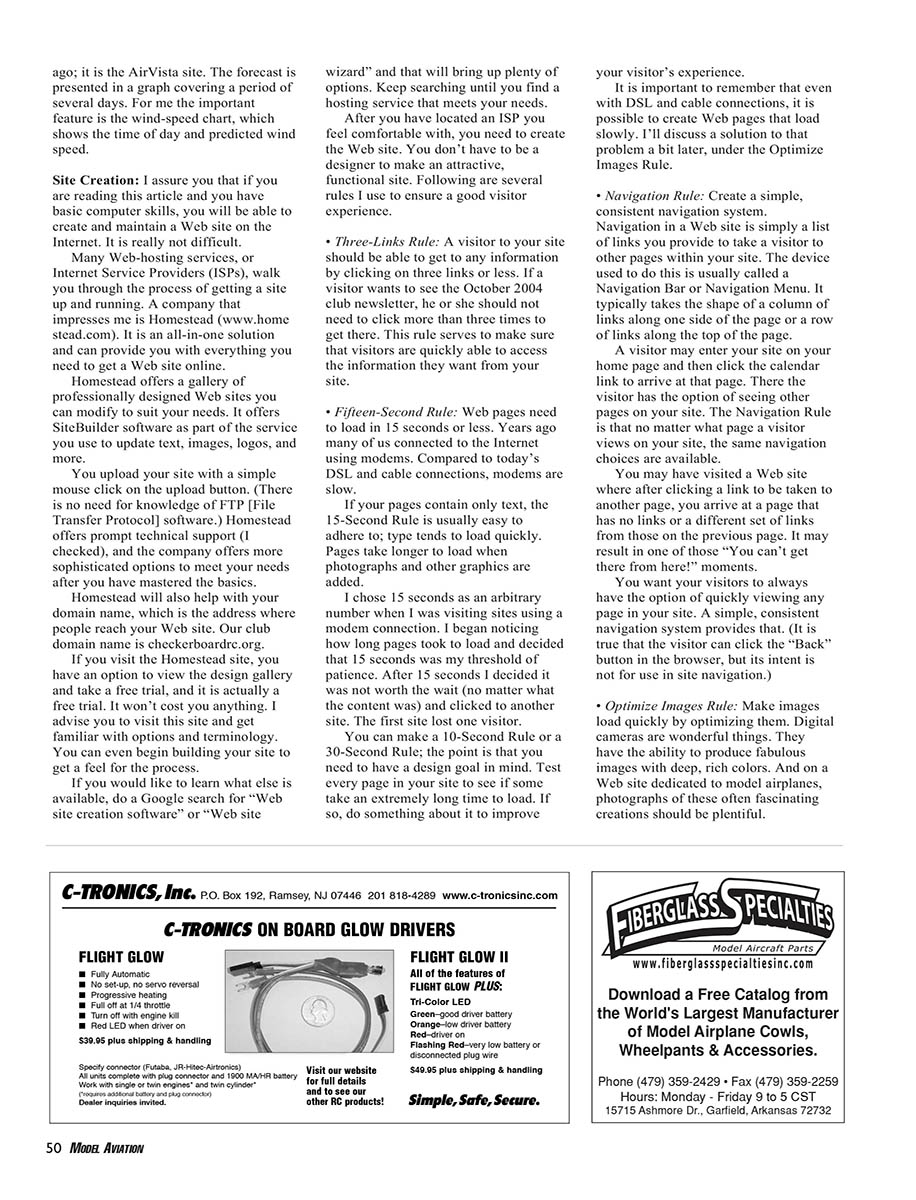
You can't think of everything. Visit other club Web sites to see what they are doing. Doing this research will give you valuable ideas.
I live in AMA District VI. The district Web site (www.csam.iit.edu/~amadist6/index.htm) has links to all other club sites in the district. The AMA Web site (www.modelaircraft.org) has a link to the Charter Club Locator, which allows you to visit sites belonging to clubs in other AMA districts. This research will be worth the effort.
Visit Your Site Rule
What? That's right. You will likely spend a lot of time building and refining your club Web site, and you will believe you know it inside and out. However, it is a good experience to visit your site on the Internet, preferably from a different computer, perhaps at a different location (check your local library). The point is to see your site as others do. I visit my club's site often, and I usually find things that need to be adjusted.
View your site on a different platform. If you use a Macintosh computer to build the site, look at it on a Windows computer.
Use different browsers. Windows Internet Explorer is one of the most popular, but others such as Firefox have a large following. You may not be able to design your site so it displays perfectly in every browser, but you should make sure it displays properly in the most popular ones.
People take pride in the model airplanes they build and fly, which is why they are involved in this hobby. Building an attractive club Web site that offers current information and is useful to people is an accomplishment to be proud of.
Once you get past some of the technical hurdles and have your new site online, you will find that it is a rewarding accomplishment. Please feel free to contact me with questions or comments.
Bill Bilautas checkerboardflyer@comcast.net
Transcribed from original scans by AI. Minor OCR errors may remain.

