
Power Switch: JR XP7202 Synthesized Radio System
Steve Kaluf
The JR XP7202 seven-channel computer radio system is the newest release from JR. At first glance a seven-channel system might suggest a fairly basic sport radio, but the XP7202 is far from basic. This is a fully synthesized system (transmitter and receiver) with extensive features for both fixed-wing aircraft and helicopters: multimodel memories, advanced mixing, pitch and throttle curves, and many other functions.
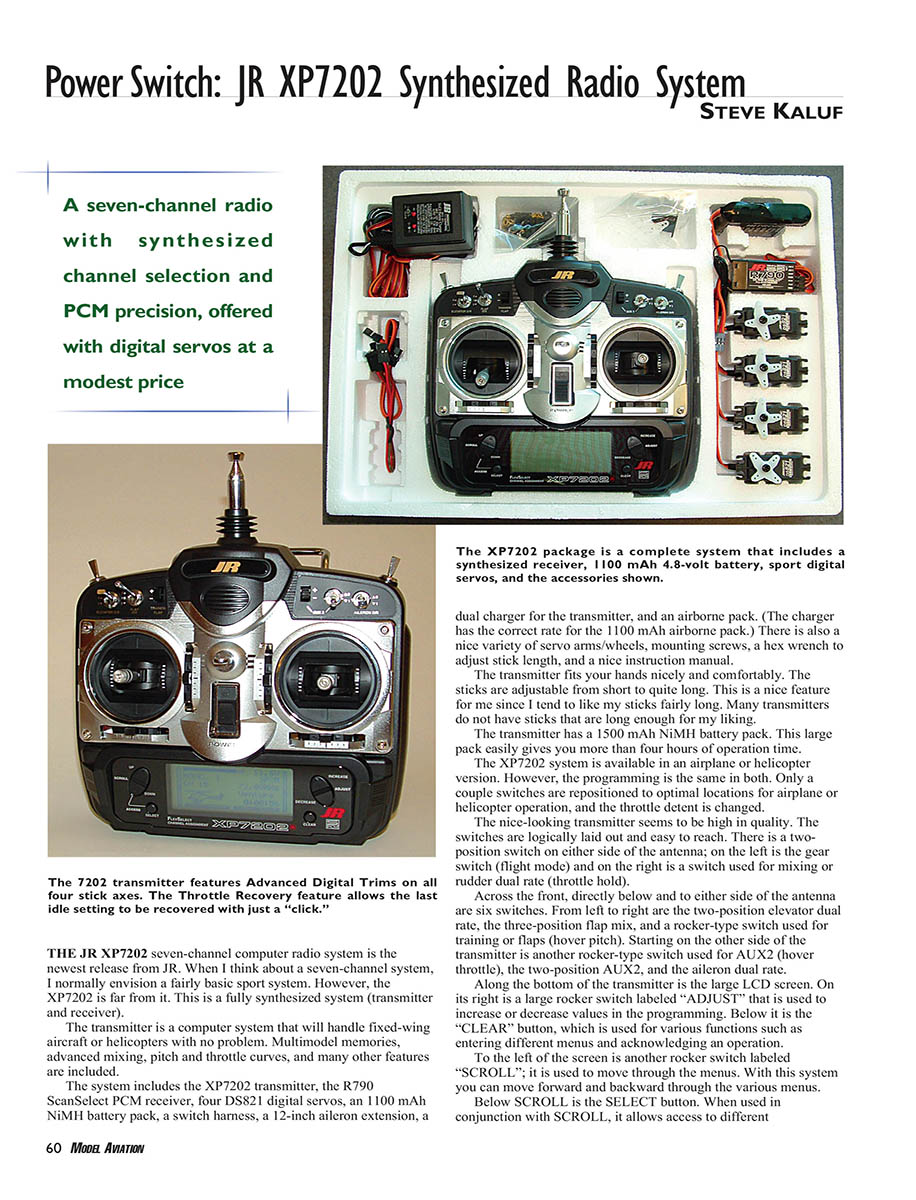
The system includes:
- XP7202 transmitter
- R790 ScanSelect PCM receiver
- Four DS821 digital servos
- 1100 mAh NiMH airborne battery pack
- Transmitter 1500 mAh NiMH battery pack
- Switch harness
- 12-inch aileron extension
- Dual charger for the transmitter (correct rate for the 1100 mAh airborne pack)
- Variety of servo arms/wheels, mounting screws, hex wrench for stick length adjustment
- Instruction manual
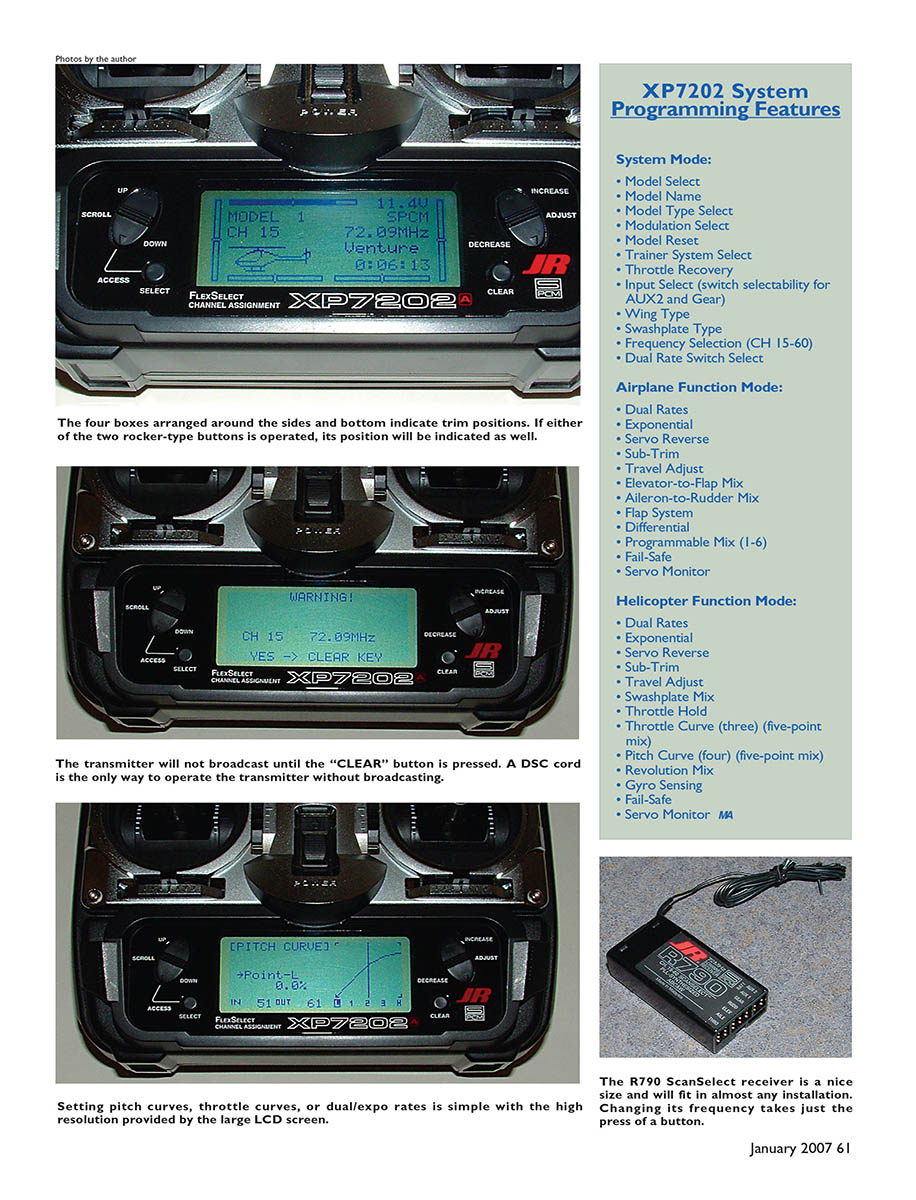
The transmitter fits comfortably in the hands and the sticks are adjustable from short to quite long — a welcome feature for pilots who prefer long stick travel. The large 1500 mAh NiMH transmitter pack easily gives more than four hours of operation.
The XP7202 system is available in airplane or helicopter versions; programming is the same for both. Only a couple of switches are repositioned for optimal airplane or helicopter use, and the throttle detent is changed.
Transmitter layout and controls
The transmitter appears well built and high quality. Switches are logically laid out and easy to reach:
- Two-position switch on either side of the antenna: left is the gear switch (flight mode), right is used for mixing or rudder dual rate (throttle hold).
- Across the front, directly below and to either side of the antenna are six switches. From left to right: two-position elevator dual rate, three-position flap mix, rocker-type switch for training or flaps (hover pitch). On the opposite side: rocker-type switch for AUX2 (hover throttle), two-position AUX2, and aileron dual rate.
Along the bottom is a large, high-resolution LCD screen. Controls near the screen:
- ADJUST rocker: increase or decrease values in programming
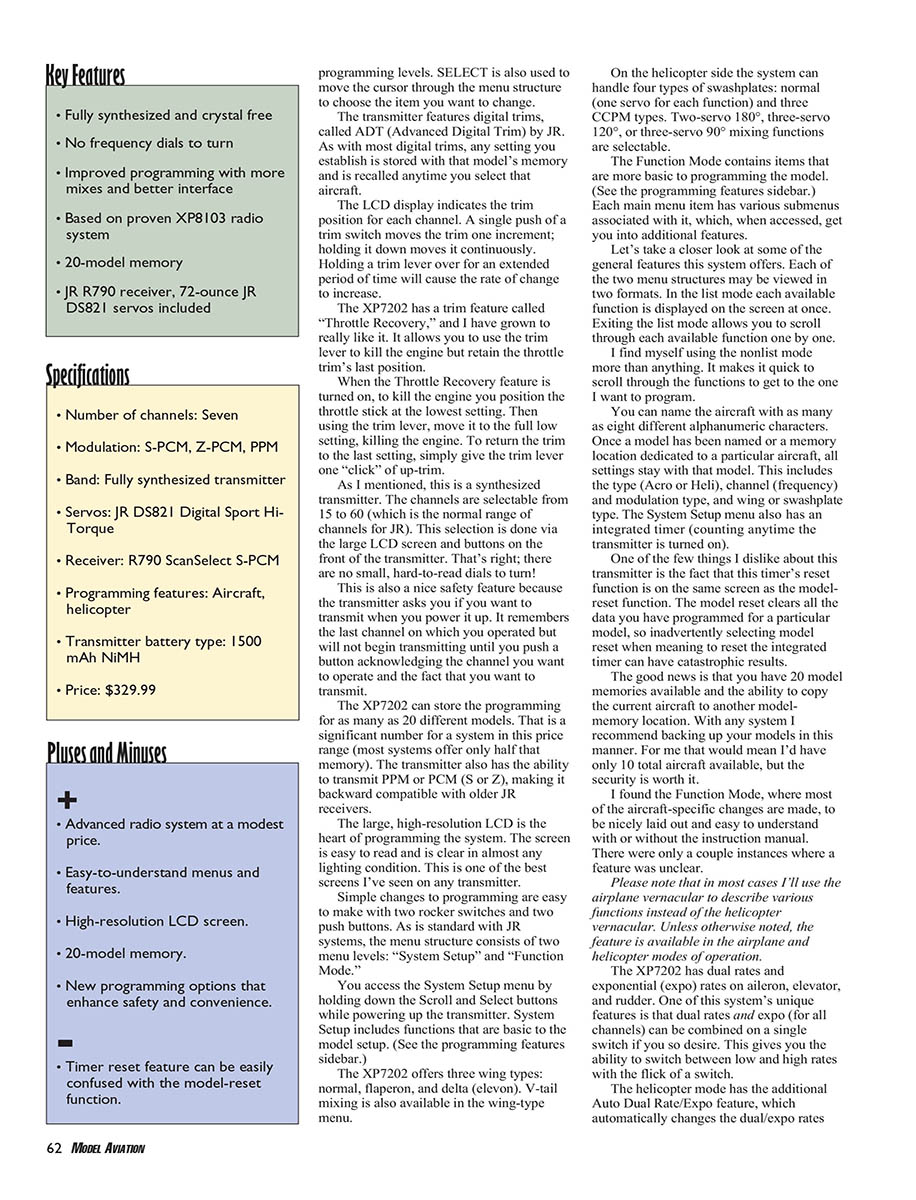
- CLEAR button: used for entering menus and acknowledging operations (the transmitter will not broadcast until CLEAR is pressed)
- SCROLL rocker: move forward and backward through menus
- SELECT button: used with SCROLL to access different menus and to move the cursor through menu items
A DSC cord is provided for direct servo control and is the only way to operate the transmitter without broadcasting.
The four boxes arranged around the sides and bottom of the screen indicate trim positions. If either of the two rocker-type buttons is operated, its position will be indicated as well.
Package servos, battery and manual
The included DS821 digital servos are a pleasant surprise. They deliver 72 ounce-inches of torque and are fast (0.19 second transit time through 60°). The output shaft is ball-bearing supported.
The instruction manual is excellent — well written with extensive graphics and screen shots — making setup and programming straightforward.
XP7202 System Programming Features
System Mode
- Model Select
- Model Name (up to 8 alphanumeric characters)
- Model Type Select (Aero or Heli)
- Modulation Select (PPM or PCM S/Z)
- Model Reset
- Trainer System Select
- Throttle Recovery
- Input Select (switch selectability for AUX2 and Gear)
- Wing Type (normal, flaperon, delta/elevon; V-tail mixing available)
- Swashplate Type (normal, CCPM: two-servo 180°, three-servo 120°, three-servo 90°)
- Frequency Selection (CH 15–60)
- Dual Rate Switch Select
- Model timer (counts whenever the transmitter is on)
Airplane Function Mode
- Dual Rates
- Exponential
- Servo Reverse
- Sub-Trim
- Travel Adjust
- Elevator-to-Flap Mix
- Aileron-to-Rudder Mix
- Flap System
- Differential
- Programmable Mix (1–6)
- Fail-Safe
- Servo Monitor
Helicopter Function Mode
- Dual Rates
- Exponential
- Servo Reverse
- Sub-Trim
- Travel Adjust
- Swashplate Mix
- Throttle Hold
- Throttle Curve (three flight modes; five-point mix)
- Pitch Curve (four flight modes; five-point mix)
- Revolution Mix
- Gyro Sensing (two switchable settings)
- Fail-Safe
- Servo Monitor
Programming and menu operation
The large, high-resolution LCD is the heart of programming. The screen is easy to read in almost any lighting condition. Simple changes are made with two rocker switches and two push buttons. The menu structure follows JR’s standard two levels: System Setup and Function Mode.
- Access System Setup by holding Scroll and Select while powering up. System Setup includes functions basic to model setup (see System Mode sidebar).
- Function Mode contains aircraft-specific items (see Function Mode sidebars). Each main menu has submenus for additional features.
Each menu structure can be viewed in two formats: list mode (all available functions displayed at once) and monolist mode (scroll through functions one by one). I find myself using the monolist mode most often; it’s quick to scroll to the desired function.
SELECT moves the cursor through menu items and is also used to choose the item you want to change. The system stores trim settings with each model memory (JR calls these ADT — Advanced Digital Trim). Trims are displayed on the LCD; a single push of a trim switch moves trim one increment, holding it moves continuously, and holding for an extended period increases the rate of change.
Throttle Recovery
Throttle Recovery is a valuable feature: it lets you use the trim lever to kill the engine while retaining the throttle trim’s last position. To kill the engine, move the throttle stick to the lowest setting and use the trim lever to the full low position. To restore the previous trim, give the trim lever one click of up-trim.
Channels, memory and safety
The XP7202 is synthesized; channels are selectable from 15 to 60 via the LCD and front buttons — no small dials. The transmitter prompts you to confirm transmission on power-up: it remembers the last channel but will not begin transmitting until you acknowledge the channel and choose to transmit. This is a helpful safety feature.
Model memory: up to 20 different models (many systems in this price range offer half that). You can transmit PPM or PCM (S or Z) for backward compatibility with older JR receivers.
Note: The model timer reset shares the same screen as Model Reset. Because Model Reset clears all programmed data for a model, take care to avoid inadvertently selecting it when you intend only to reset the timer. You can copy a model to another memory location, which is a sensible backup practice.
Mixing, rates and special functions
- Dual rates and exponential (expo) are available on aileron, elevator, and rudder. Unique to this system: dual rates and expo for all channels can be combined on a single switch, letting you switch between low and high rates instantly.
- Helicopter Auto Dual Rate/Expo automatically changes dual/expo rates when switching flight modes between Normal, ST-1 (Stunt 1), ST-2 (Stunt 2), or Throttle Hold.
- Servo reversing is handled with a graphic screen; use SELECT to choose the channel and ADJUST to reverse.
- Sub-Trim and Travel Adjust menus are quick and easy.
- Elevator-to-Flap and Aileron-to-Rudder mixing are preprogrammed menus that simplify setup.
- Automatic Landing: used primarily for sailplanes; the throttle stick activates the function and can adjust elevator, flaps, and spoilers. The function is switchable with the Flap Mixing switch.
- Differential Aileron Mixing is available for individual aileron control when separate servos drive each aileron.
- Helicopter five-point pitch and throttle curves are switchable among the three flight modes and Throttle Hold. Curves are displayed clearly on the LCD for precise adjustments.
- Revolution Mixing and Gyro Sensitivity: gyro sensitivity allows two switchable settings.
- Programmable mixes: six available in airplane mode (mixes 5 and 6 are trimmable), three in helicopter mode. Trimmable mixes let a master channel’s trim affect slave channels — ideal for dual-elevator-servo setups.
Fail-safe and Servo Monitor
In PCM modulation modes, fail-safe is available. You can select which of the seven channels moves to a preset fail-safe position when fail-safe activates. Choose either Fail-Safe (moves to preset positions) or Hold (keeps the last good position). Fail-safe setup is straightforward: move sticks/switches to desired positions and press one button.
The Servo Monitor screen shows the real-time position of each channel, which is useful when setting up complex mixing.
R790 ScanSelect PCM Receiver
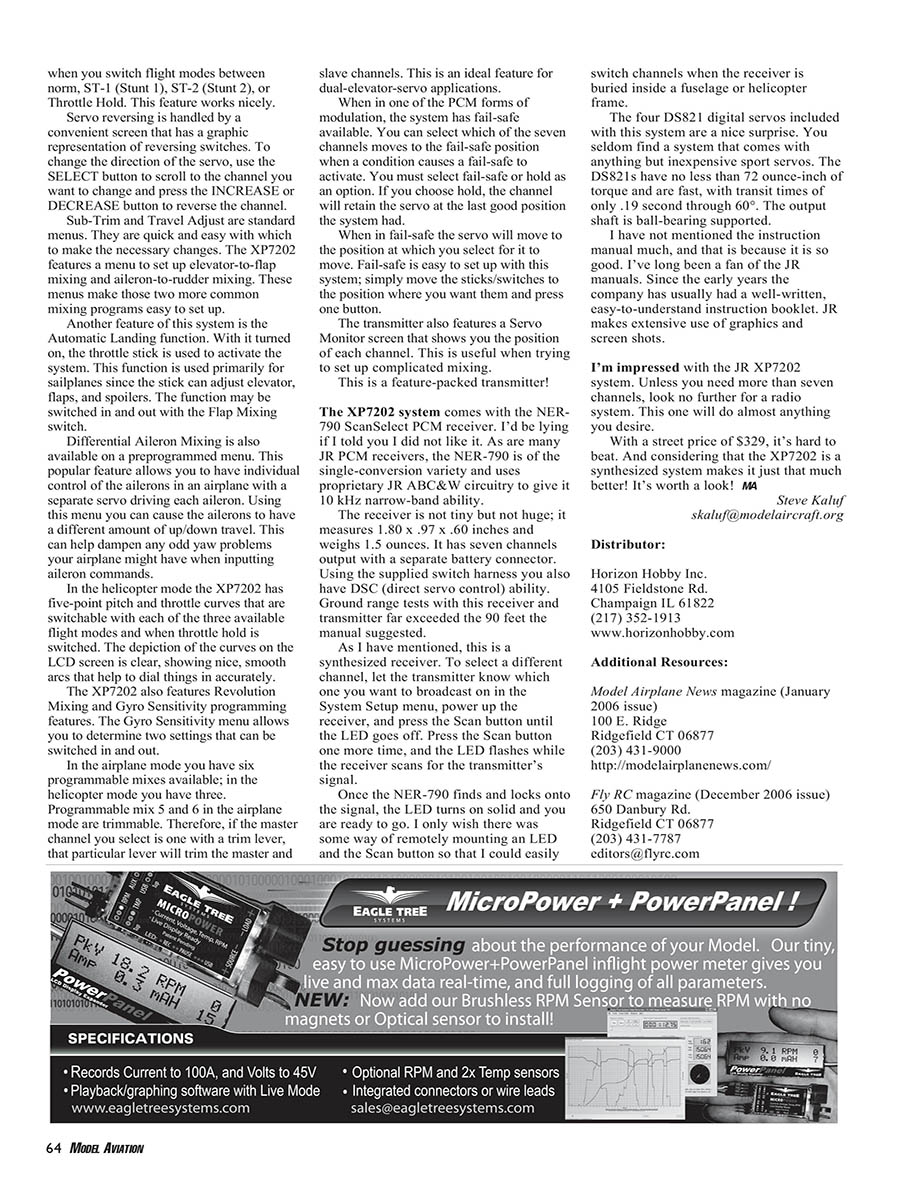
The system includes the R790 ScanSelect PCM receiver. Like many JR PCM receivers, it is a single-conversion design using JR ABC&W circuitry to provide 10 kHz narrow-band capability.
Receiver specs:
- Size: 1.80 x 0.97 x 0.60 inches
- Weight: 1.5 ounces
- Outputs: seven channels with separate battery connector
Using the supplied switch harness gives DSC (direct servo control) capability. Ground range tests with this receiver and transmitter exceeded the 90 feet suggested by the manual.
Channel selection is simple: set the desired channel on the transmitter in System Setup, power up the receiver, press the Scan button until the LED goes off, then press Scan again while the receiver scans. Once it locks, the LED turns solid. The receiver is easy to use, though I would like the option of remotely mounting the LED and Scan button to facilitate channel changes when the receiver is buried in a fuselage or frame.
Conclusions and price
This is a feature-packed transmitter and receiver system. Unless you need more than seven channels, the JR XP7202 is an excellent all-around choice. With a street price of $329 and being synthesized, it offers strong value and versatility for both airplane and helicopter pilots.
Contact:
- Steve Kaluf — skaluf@modelaircraft.org
Distributor:
- Horizon Hobby Inc.
- 4105 Fieldstone Rd., Champaign IL 61822
- (217) 352-1913
- www.horizonhobby.com
Additional Resources:
- Model Airplane News magazine (January 2006 issue)
- 100 E. Ridge, Ridgefield CT 06877
- (203) 431-9000
- http://modelairplanenews.com
- Fly RC magazine (December 2006 issue)
- 650 Danbury Rd., Ridgefield CT 06877
- (203) 431-7787
- editors@flyrc.com
Transcribed from original scans by AI. Minor OCR errors may remain.

