
Radio Control Helicopters
Paul Tradelius, 6704 Santiago, Ft. Worth TX 76133
Flight Simulators
In the past few years personal computers (PCs) have become more common household items. Several companies have developed helicopter flight simulators that enable a flier to practice flying in the comfort of his or her home—without fear of crashing.
Because these simulators are not inexpensive, the two most common questions I hear are:
- Are they worth the money?
- Can a person learn to fly a helicopter using a simulator?
As far as the price is concerned, the real value of a flight simulator is that it keeps you from crashing your own helicopter. Whenever you go out to practice—whether it's basic hovering for the novice or 3-D flying for the expert—there is always the possibility of a mishap (I don't like the word "crash"). We certainly try to keep mishaps to a minimum, but unfortunately, making mistakes is part of the learning process. What makes us better pilots is learning from our mistakes.
These mishaps are actually more detrimental to the learning process than we would expect. Our first concern after a mishap is the repair cost to replace the damaged pieces. A second concern is the time required to fix the helicopter—time we could be out flying.
Finally, the mishap causes a seed of fear to grow in our minds—it makes us even more concerned about our next flight. The combination of these concerns doesn't stop the learning process—it reverses it, because now we're afraid to practice the maneuver that caused the mishap in the first place.
The good news is that flight simulators can eliminate (or at least reduce) all of these associated problems.
With most simulators you can adjust the helicopter setup and the weather conditions. This way you can customize your training for a particular maneuver and practice without worrying about potential mishaps. If a mishap occurs (and it will) the helicopter fixes itself, and you can try again. This ability to practice with reckless abandon is a great asset to any pilot; the cost savings in mental anguish and repair parts is very real.
The second question—whether or not a person can learn to fly using a simulator—is contingent on how well the simulator represents the flight characteristics of their model. If there is very little correlation between the simulator and the movements and reactions of your helicopter, the simulator will not be doing its job.
However, expecting a simulator to "fly" exactly like your model helicopter is a little unrealistic, because a simulator does just that—it simulates. What we are looking for is something that approaches the flight characteristics of the helicopter as closely as possible.
The good news is that all of the flight simulators I'm aware of have a set of flight parameters that can be customized to tailor the flight performance to your desires.
The real advantage of a flight simulator is that it enables pilots to practice a lot—anytime, day or night, regardless of the weather. A big part of learning to fly a helicopter is getting plenty of "stick time." The more you practice, the more mistakes you will make, and the more you will learn.
Even if the simulator doesn't completely represent your actual helicopter, it will still help you to react instinctively and make the correct control inputs for a given situation. In many cases these control inputs need to be made immediately; often there is very little time to analyze what's going on.
When you think about the cost of a flight simulator, compare it to the repair cost of a couple of mishaps. Think about the amount of practice time you can get in during the evenings or when the weather is bad. I have always found simulators to be a good investment; they improve not only my capabilities but also my overall enjoyment of the hobby.
The NHP Helicopter Simulator
The NHP unit is one of the newest simulators on the market and has several features that advance the state of the art.
One common "problem" with other simulators is that they come with a simulated transmitter controller, which is not the same transmitter you'll use to fly your model. The NHP is designed to use your actual model transmitter—including all of the switch positions and flight parameters you use for pitch curves, throttle curves, throttle hold, and servo mixing.
To use it, plug the computer-interface cord into your transmitter, turn on the program, select your transmitter from the menu, and away you go. If your transmitter isn't one of the preloaded models, you can set up and store your transmitter in the program. The ability to use your own transmitter becomes especially important when you're practicing aerobatics or autorotation; it makes the simulation closer to the real thing.
Other useful features of the NHP simulator:
- It comes preloaded with flight parameters for 17 of the most popular helicopter models. The proper flight parameters have been researched by the designers—the simulator is ready to train you on your helicopter right out of the box.
- If your helicopter is not on the list (or if you wish to adjust the parameters), customization has been made easy. Simple parameters such as main-rotor diameter, main-blade weight, tail-rotor diameter, and helicopter weight can be modified and saved to fine-tune the simulator's flight characteristics.
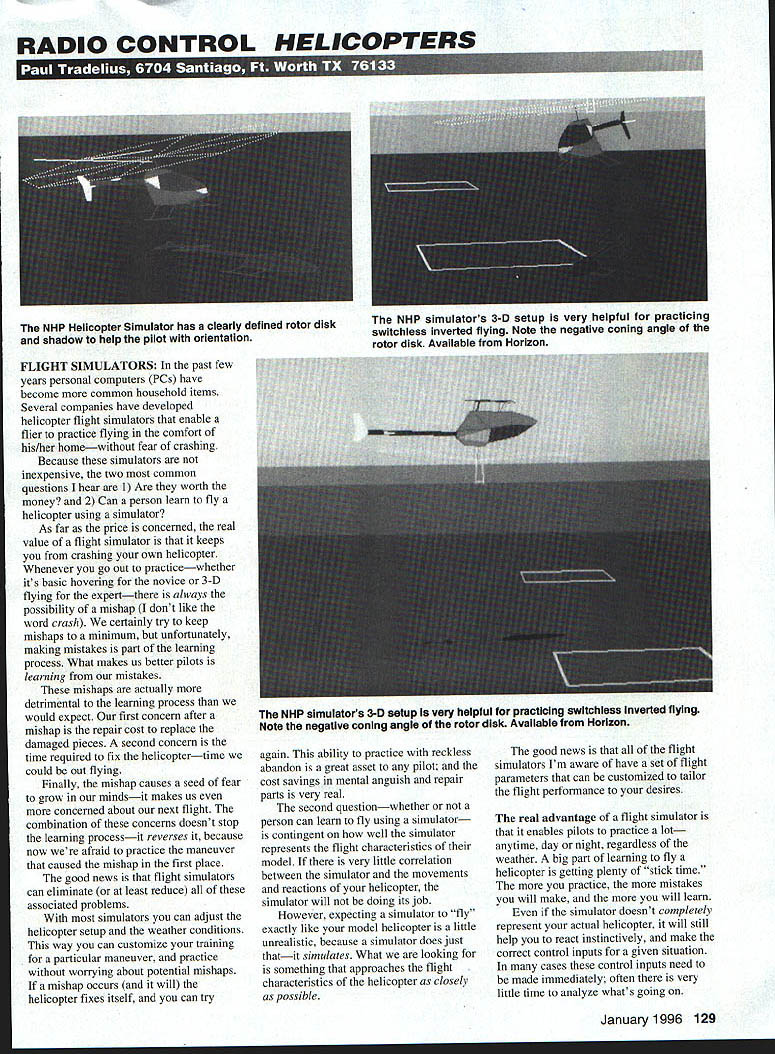
- Excellent graphics: the coning angle of the main-rotor blades changes as the blades load or unload; the simulated sun actually reflects off the canopy. These details keep you better oriented with the helicopter and improve realistic flying.
Look at the photos and note the negative coning angle, the shadow of the helicopter on the ground, and the sun reflecting off portions of the fuselage—it's very realistic.
You will need a fairly sophisticated computer to take full advantage of the NHP simulator's performance capabilities. It requires an IBM-compatible 486 machine, at least 1 MB of RAM, DOS 3.1 (or higher), and a 3-1/2 inch disk drive. Menu selections are made with the mouse or the keyboard.
The package includes:
- The program disk
- The interface adapter
- The interface cord
- Instructions
When you see this one, I think you'll be as impressed as I was.
Transcribed from original scans by AI. Minor OCR errors may remain.

