
RADIO CONTROL HELICOPTERS
Paul Tradelius 4620 Barracuda Dr., Bradenton, FL 34208 E-mail: flytrade@earthlink.net
Overview
The quality and reliability of radio equipment continues to improve, so it's rare to hear of anyone having radio problems not caused by a crash or some other known reason. However, periodically I get a letter from someone who is having a specific problem and would like to know what can be done short of sending the radio back to the manufacturer or a service facility for repair.
Not that sending the unit in for a checkup is a bad idea, but some problems are intermittent and would be very difficult, if not impossible, to find on the workbench.
A tricky intermittent glitch
I received a letter from Rod Murray of Harrisburg, PA, whose radio problem was an intermittent glitch while flying. Many of us who have been flying for a period of time have experienced glitches, but his is a little different: it happens above the same area of the flying field. You might immediately think there must be a problem in that specific area, such as a power line or some other electrical disturbance, but that's not the case.
Rod's is the worst type of radio problem to have. I would much rather have a consistent problem so the cause can be traced to the offending component and fixed, but this glitch is right on the edge. The radio works most of the time, and the problem only shows itself in a certain area of flight.
If Rod sent the radio in to be fixed, it's probable that no problems would show up on the workbench. Then the best solution would be to replace the most likely part(s), which would be a hit-and-miss situation. The technician might have seen this problem before and would have a better chance to replace the malfunctioning part, but there is no way to know for sure without taking the helicopter up in the problem area.
Although there is no single right or wrong way to solve these types of radio problems, there are a few things that can be done before sending the radio off to be repaired.
Initial checks and installation
- Inspect the radio and its installation for any obvious problem areas.
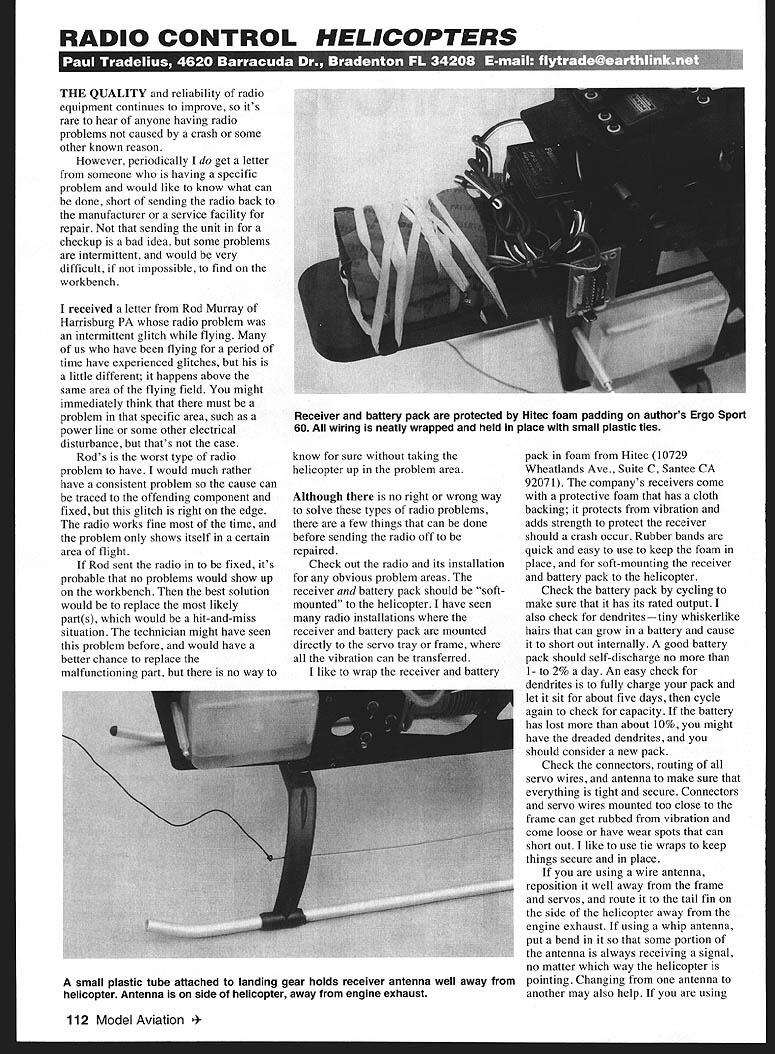
- The receiver and battery pack should be soft-mounted to the helicopter. I have seen many installations where the receiver and battery pack are mounted directly to the servo tray or frame, allowing vibration to be transferred.
- I like to wrap the receiver and battery pack in foam from Hitec (10729 Wheatlands Ave., Suite C, Santee, CA 92071). The company's receivers come with a protective foam that has a cloth backing; it protects from vibration and adds strength to protect the receiver should a crash occur.
- Use rubber bands to keep the foam in place and to soft-mount the receiver and battery pack to the helicopter.
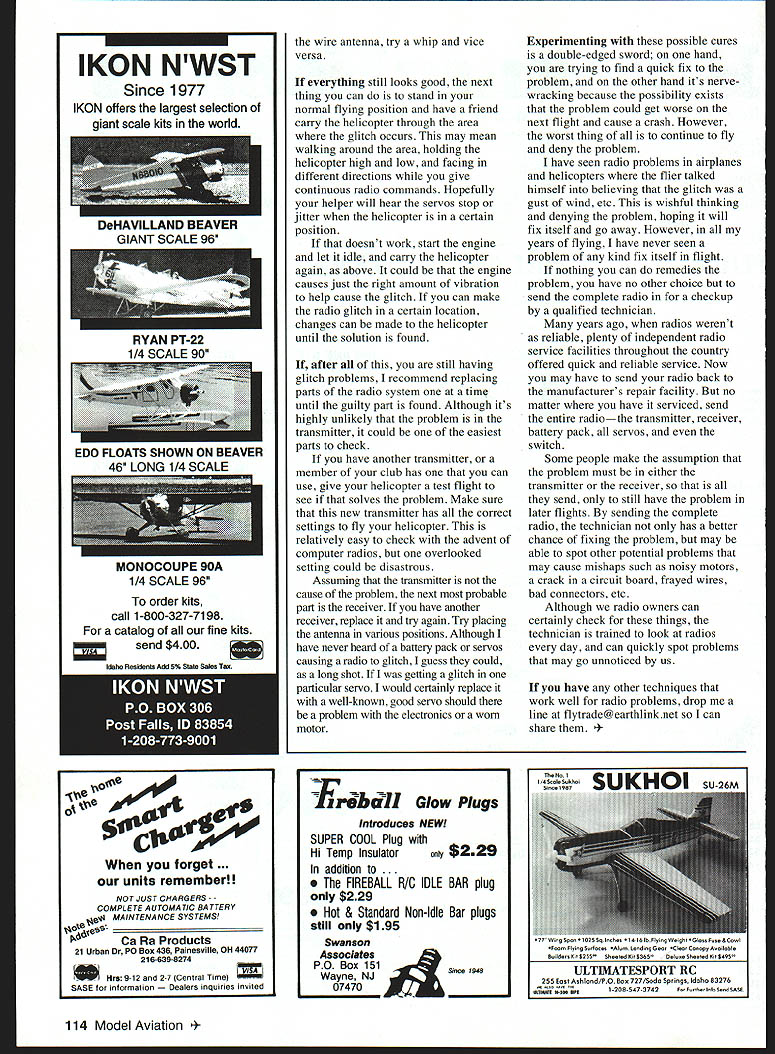
- Check connectors, routing of all servo wires, and the antenna to make sure everything is tight and secure. Connectors and servo wires mounted too close to the frame can get rubbed from vibration and come loose or develop wear spots that can short out. I like to use tie wraps to keep things secure and in place.
Battery check
- Cycle the battery pack to ensure it has its rated output.
- Check for dendrites—tiny whiskerlike hairs that can grow in a battery and cause internal shorts.
- A good battery pack should self-discharge no more than 1–2% per day.
- An easy check for dendrites is to fully charge the pack, let it sit for about five days, then cycle again to check capacity. If the battery has lost more than about 10%, you might have dendrites and should consider a new pack.
Antenna and wiring
- If you are using a wire antenna, reposition it well away from the frame and servos, and route it to the tail fin on the side of the helicopter away from the engine exhaust.
- If using a whip antenna, put a bend in it so that some portion of the antenna is always receiving a signal, no matter which way the helicopter is pointing.
- Changing from one antenna type to another may also help.
Field diagnosis
If everything still looks good, try this field test:
- Stand in the normal flying position and have a friend carry the helicopter through the area where the glitch occurs.
- Have the helper walk around the area holding the helicopter high and low and facing different directions while you give continuous radio commands.
- Listen for servos stopping or jittering when the helicopter is in a certain position that doesn't work.
- Start the engine and let it idle, then carry the helicopter again above the area. It could be that the engine causes just the right amount of vibration to help produce the glitch.
- Make changes to the helicopter until a solution is found.
Replacing parts
If you still have glitch problems, replace parts of the radio system one at a time until the guilty part is found.
- Although it's highly unlikely that the transmitter is the cause, it is one of the easiest parts to check. If you can borrow another transmitter from a club member, use it to give the helicopter a test flight to see if it solves the problem. Make sure the replacement transmitter has all the correct settings to fly your helicopter—this is relatively easy to check with computer radios, but one overlooked setting could be disastrous.
- Assuming the transmitter is not the cause, the next most probable part is the receiver. If you have another receiver, replace it and try again. Try placing the antenna in various positions.
- Although I have never heard of a battery pack or servos causing a radio to glitch, they could, as a long shot. If a particular servo shows glitching, replace it with a known-good servo in case of electrical trouble or a worn motor.
Experimenting with these possible cures is a double-edged sword; on one hand you are trying to find a quick fix, and on the other hand it's nerve-wracking because the problem could get worse on the next flight and cause a crash. However, the worst thing is to continue to fly and deny the problem.
I have seen radio problems in airplanes and helicopters where the flier convinced himself the glitch was a gust of wind, etc. This is wishful thinking and denial. In all my years of flying, I have never seen a problem of any kind fix itself in flight.
Sending the radio for service
If nothing you can do remedies the problem, your only choice is to send the complete radio in for a checkup by a qualified technician.
Many years ago, when radios weren't as reliable, plenty of independent radio service facilities offered quick, reliable service. Now you may have to send your radio back to the manufacturer's repair facility. But no matter where you have it serviced, send the entire radio — the transmitter, receiver, battery pack, all servos, and even the switch.
Some people assume the problem must be in either the transmitter or receiver and send only those parts, only to still have the problem in later flights. By sending the complete radio, the technician not only has a better chance of finding the problem, but may be able to spot other potential issues that could cause mishaps, such as noisy motors, a crack in a circuit board, frayed wires, bad connectors, etc.
Although we radio owners can certainly check for these things, the technician is trained to look at radios every day and can quickly spot problems that may go unnoticed by us.
Closing
If you have any other techniques that work well for radio problems, drop me a line at flytrade@earthlink.net so I can share them.
Transcribed from original scans by AI. Minor OCR errors may remain.

