
RADIO CONTROL SLOPE SOARING
Will Byers, 3540 Eastlake Dr., West Richland WA 99352
COMPUTER-AIDED DRAFTING (CAD)
Glider and sailplane design has changed immensely in the last decade. Where built-up models were once the norm, we now have all-composite molded airplanes taking their place. The results are outstanding. The models we now fly are oftentimes superships, with state-of-the-art hardware driving their control surfaces.
The way these designs are created has also changed. The once-familiar slide rule and drawing board have been replaced by the computer, monitor, software, and plotter/printer. Consequently, what previously took weeks or months to create can now be designed and modeled in hours or days. And the results of this modernization are unprecedented!
How many of you purchased your first computer to further aid you in your hobby? Me too! I bought my first computer to do computer-aided drafting and design (CADD) for the airplanes I like to fly. Life has forever changed!
As Slope Soaring enthusiasts, we are on the leading edge of technology. Over the next two columns we'll explore the tremendous world of CAD. At first, you may not see the tie-in to Slope Soaring; however, if you stand back and look at the successful designs coming to market today, you will soon recognize that CAD has benefited the design of slope models.
My discussion of CAD will focus around a product I consider the best two-dimensional software package on the market today. I don't say this lightly, because there are many good CAD packages on the market. I've used AutoCAD for more than six years. I've also used MiniCAD, Claris CAD, played with ModelCAD, used Paint programs, and even used a previous version of MacDraw. These are all superb packages. However, few (if any) can match the power of Ashlar's DrawingBoard.
Ashlar's DrawingBoard delivers intuitiveness, ease of use, and more. As Burt Rutan says, "I needed a tool to enhance the creative process and shorten my design cycles. Vellum (Ashlar's 3-D product) is the only design tool that meets these specifications."
So, what's special about DrawingBoard? Isn't drawing a line, a circle, or a polygon all the same? Hardly! They are all objects, but objects are treated differently from program to program. I believe the way Ashlar treats objects is the way they were meant to be used; they treat them as objects in their code, which means they can be edited as objects. We'll talk more about this later.
Dr. Newell, the cofounder of Ashlar, has more than 20 years of experience in CAD and computer technologies. His extensive computer science background and Ph.D., mixed with a BS in Mechanical Engineering, means that the product is geared to the engineering community and designers.
Graphical User Interface
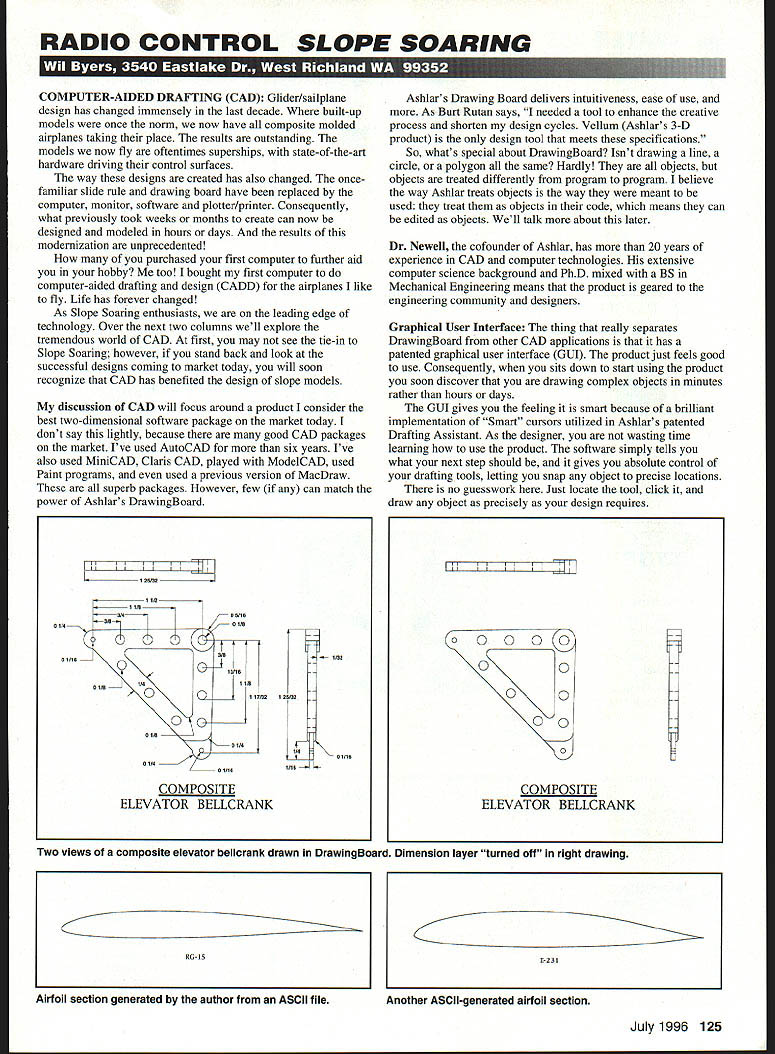
The thing that really separates DrawingBoard from other CAD applications is that it has a patented graphical user interface (GUI). The product just feels good to use. Consequently, when you sit down to start using the product you soon discover that you are drawing complex objects in minutes rather than hours or days.
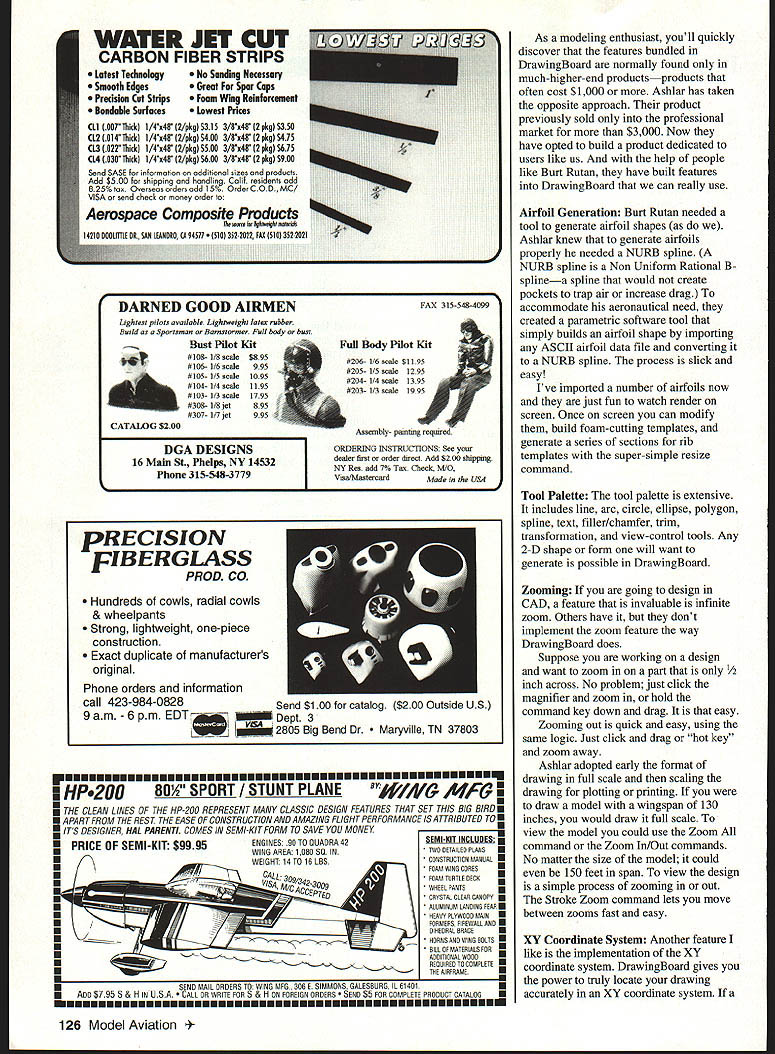
The GUI gives you the feeling it is smart because of a brilliant implementation of "Smart" cursors utilized in Ashlar's patented Drafting Assistant. As the designer, you are not wasting time learning how to use the product. The software simply tells you what your next step should be, and it gives you absolute control of your drafting tools, letting you snap any object to precise locations. There is no guesswork here. Just locate the tool, click it, and draw any object as precisely as your design requires.
As a modeling enthusiast, you'll quickly discover that the features bundled in DrawingBoard are normally found only in much higher-end products — products that often cost $1,000 or more. Ashlar has taken the opposite approach. Their product previously sold only into the professional market for more than $3,000. Now they have opted to build a product dedicated to users like us. And with the help of people like Burt Rutan, they have built features into DrawingBoard that we can really use.
Airfoil Generation
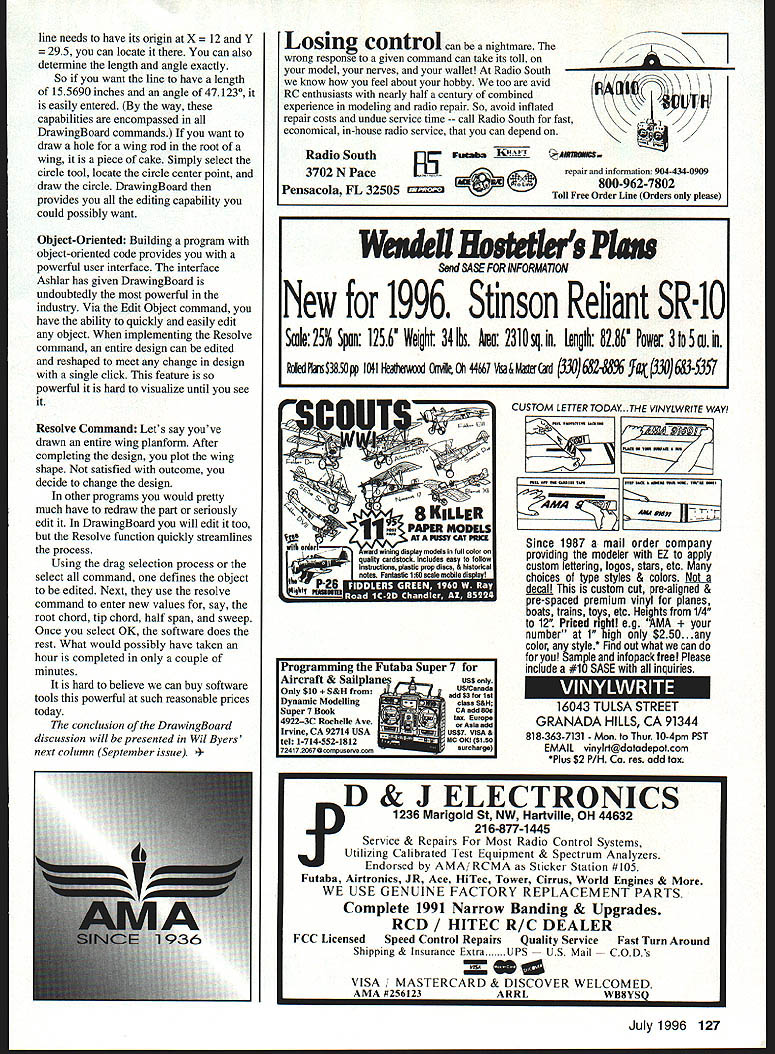
Burt Rutan needed a tool to generate airfoil shapes (as do we). Ashlar knew that to generate airfoils properly he needed a NURB spline. (A NURB spline is a Non-Uniform Rational B-spline — a spline that would not create pockets to trap air or increase drag.) To accommodate his aeronautical need, they created a parametric software tool that simply builds an airfoil shape by importing any ASCII airfoil data file and converting it to a NURB spline. The process is slick and easy!
I've imported a number of airfoils now and they are just fun to watch render on screen. Once on screen you can modify them, build foam-cutting templates, and generate a series of sections for rib templates with the super-simple resize command.
Tool Palette
The tool palette is extensive. It includes:
- Line
- Arc
- Circle
- Ellipse
- Polygon
- Spline
- Text
- Filler/chamfer
- Trim
- Transformation
- View-control tools
Any 2-D shape or form one will want to generate is possible in DrawingBoard.
Zooming
If you are going to design in CAD, a feature that is invaluable is infinite zoom. Others have it, but they don't implement the zoom feature the way DrawingBoard does.
Suppose you are working on a design and want to zoom in on a part that is only 1/2 inch across. No problem; just click the magnifier and zoom in, or hold the command key down and drag. It is that easy. Zooming out is quick and easy, using the same logic. Just click and drag or use the hot key and zoom away.
Ashlar adopted early the format of drawing in full scale and then scaling the drawing for plotting or printing. If you were to draw a model with a wingspan of 130 inches, you would draw it full scale. To view the model you could use the Zoom All command or the Zoom In/Out commands. No matter the size of the model — it could even be 150 feet in span — to view the design is a simple process of zooming in or out. The Stroke Zoom command lets you move between zooms fast and easy.
XY Coordinate System
Another feature I like is the implementation of the XY coordinate system. DrawingBoard gives you the power to locate your drawing accurately in an XY coordinate system. If a point needs to be located at X, Y you can type the coordinates in or simply drag the object to the approximate location and read the actual coordinates from the cursor readout.
If a line needs to have its origin at X = 12 and Y = 29.5, you can locate it there. You can also determine the length and angle exactly. So if you want the line to have a length of 15.5690 inches and an angle of 47.23°, it is easily entered. (By the way, these capabilities are encompassed in all DrawingBoard commands.) If you want to draw a hole for a wing rod in the root of a wing, it is a piece of cake. Simply select the circle tool, locate the circle center point, and draw the circle. DrawingBoard then provides you all the editing capability you could possibly want.
Object-Oriented
Building a program with object-oriented code provides you with a powerful user interface. The interface Ashlar has given DrawingBoard is undoubtedly the most powerful in the industry. Via the Edit Object command, you have the ability to quickly and easily edit any object. When implementing the Resolve command, an entire design can be edited and reshaped to meet any change in design with a single click. This feature is so powerful it is hard to visualize until you see it.
Resolve Command
Let's say you've drawn an entire wing planform. After completing the design, you plot the wing shape. Not satisfied with the outcome, you decide to change the design.
In other programs you would pretty much have to redraw the part or seriously edit it. In DrawingBoard you will edit it too, but the Resolve function quickly streamlines the process.
- Use the drag selection process or the Select All command to define the object to be edited.
- Use the Resolve command to enter new values for parameters such as root chord, tip chord, half span, and sweep.
- Select OK and the software does the rest.
What would possibly have taken an hour is completed in only a couple of minutes.
It is hard to believe we can buy software tools this powerful at such reasonable prices today.
The conclusion of the DrawingBoard discussion will be presented in Will Byers' next column (September issue).
Transcribed from original scans by AI. Minor OCR errors may remain.

