

George M. Myers
Radio Technique
70 Froehlich Farm Rd., Hicksville, NY 11801
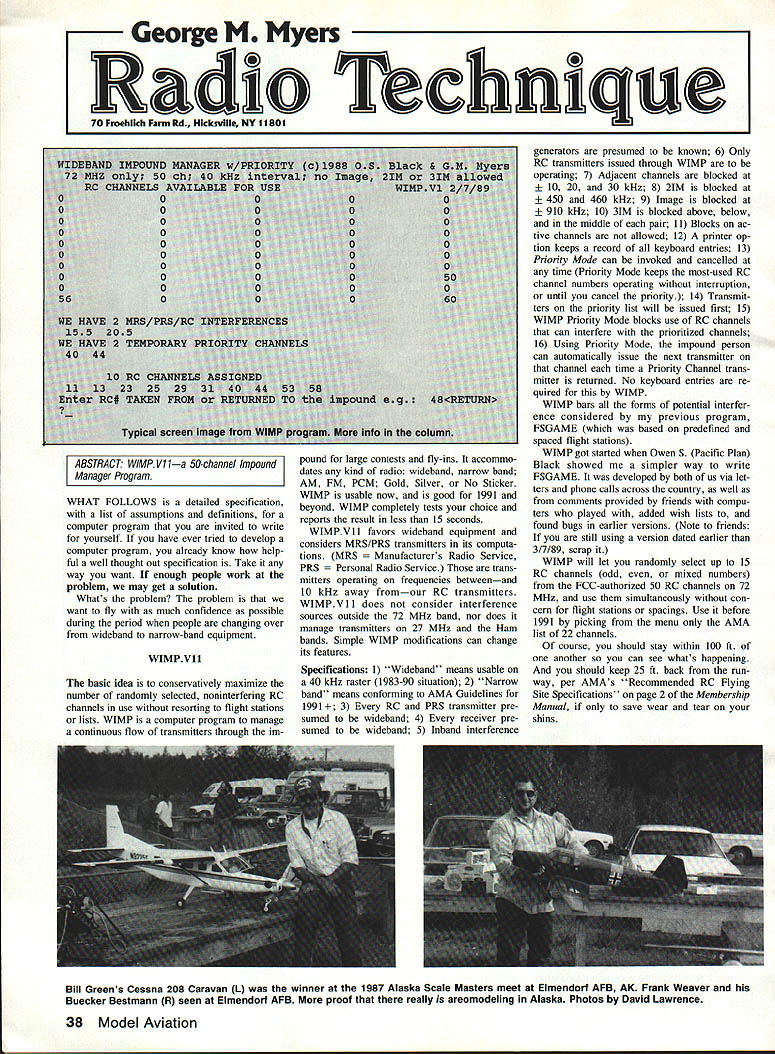
WIDEBAND IMPOUND MANAGER W/PRIORITY (c) 1988 O.S. Black & G.M. Myers 72 MHz ONLY; 50 CH; 40 kHz INTERVAL; NO IMAGE; 2IM OR 3IM ALLOWED RC CHANNELS AVAILABLE FOR USE WIMP.V1 2/7/89
0 0 0 0 0 0 0 0 0 0 0 0 0 0 0 0 0 0 0 0 0 0 0 0 0 0 0 0 0 0 0 0 0 0 0 0 0 0 0 0 0 0 0 0 0 0 0 0 0 0 0 0 0 0 0 0 0 0 0 0 0 0 0 0 0 0 0 0 0 50 56 60
WE HAVE 2 MRS/PRS/RC INTERFERENCES 15.5 20.5
WE HAVE 2 TEMPORARY PRIORITY CHANNELS 40 44
10 RC CHANNELS ASSIGNED 11 13 23 25 29 31 40 44 53 58
ENTER RC# TAKEN FROM OR RETURNED TO the impound e.g.; 48 [RETURN]
Typical screen image from WIMP program. More info in the column.
ABSTRACT
WIMP.V11a - a 50-channel Impound Manager Program. Functional description.
WHAT FOLLOWS is a detailed specification, with a list of assumptions and definitions, for a computer program that you are invited to write for yourself. If you have ever tried to develop a computer program, you already know how helpful a well thought-out specification is. Take it any way you want. If enough people work at the problem, we may get a solution.
What's the problem? The problem is that we want to fly with as much confidence as possible during the period when people are changing over from wideband to narrow-band equipment.
WIMP.V11
The basic idea is to conservatively maximize the number of randomly selected, noninterfering RC channels in use without resorting to flight stations or lists. WIMP is a computer program to manage a continuous flow of transmitters through the impound for large contests and fly-ins. It accommodates the kind of radio: wideband, narrow-band; AM, FM, PCM; Gold, Silver, or No Sticker. WIMP is usable now, and is good for 1991 and beyond. WIMP completely tests your choice and reports the result in less than 15 seconds.
WIMP.V11 favors wideband equipment and considers MRS/PRS transmitters in its computations. (MRS = Manufacturer's Radio Service, PRS = Personal Radio Service.) Those are transmitters operating on frequencies between—and 10 kHz away from—our RC transmitters. WIMP.V11 does not consider interference sources outside the 72 MHz band, nor does it manage transmitters on 27 MHz and the Ham bands. Simple WIMP modifications can change its features.
Specifications
- "Wideband" means usable on a 40 kHz raster (1983–90 situation).
- "Narrow-band" means conforming to AMA Guidelines (1991).
- RC PRS transmitter presumed wideband.
- Receiver presumed wideband.
- Inband interference generators presumed known.
- Only RC transmitters issued through WIMP are to be operating.
- Adjacent channels are blocked at ±10, ±20, ±30 kHz.
- 2IM is blocked at ±450 and ±460 kHz.
- Image is blocked at ±910 kHz.
- 3IM is blocked above, below, and in the middle of each pair.
- Blocks on active channels are not allowed.
- A printer option keeps a record of all keyboard entries.
- Priority Mode can be invoked and cancelled at any time. (Priority Mode keeps the most-used RC channel numbers operating without interruption, or until you cancel the priority.)
- Transmitters on the priority list will be issued first.
- WIMP Priority Mode blocks use of RC channels that can interfere with prioritized channels.
- Using Priority Mode, the impound person can automatically issue the next transmitter on that channel each time a Priority Channel transmitter is returned. No keyboard entries required for this by WIMP.
WIMP bars all the forms of potential interference considered by my previous program, FSGAME (which was based on predefined and spaced flight stations). WIMP got started when Owen S. (Pacific Plan) showed me a simpler way to write FSGAME. It was developed by both of us via letters and phone calls across the country, as well as from comments provided by friends with computers who played with, added wish lists to, and found bugs in earlier versions. (Note to friends: if you are still using a version dated earlier than 3/7/89, scrap it.)
WIMP will let you randomly select up to 15 RC channels (odd, even, or mixed numbers) from the FCC-authorized 50 RC channels on the 72 MHz band, and use them simultaneously without concern for flight stations or spacings. Use it before 1991 by picking from the menu only the AMA list of 22 channels.
Of course, you should stay within 100 ft. of one another so you can see what's happening. And you should keep 25 ft. back from the runway, per AMA's "Recommended RC Flying Site Specifications" on page 2 of the Membership Manual, if only to save wear and tear on your shins.
Functional description
WIMP is a small digital computer program that is designed to minimize interference possibilities for RC operations in the 72 MHz Aircraft Only band. It is intended for use in a lap-top computer, to help you manage the flow of transmitters into and out of an impound.
Every one of the 50 RC channels and the 50 PRS channels in the 72 MHz band is considered in the calculations, but only RC channels are displayed on the menu. Interference sources outside the band, and RC transmitters on 27 MHz and the Ham bands, are not managed with this version. An option to use a printer to log all keyboard transactions is included.
Operation
WIMP is written in MBASIC and can be used in any computer with BASIC plus about 15 kilobytes of RAM available for the program and its computations. Said computer may be a hand-held, lap-top, and/or desktop model.
Install your BASIC. Then type LOAD "WIMP" [CR]. WIMP should come up running, in a single-color, nonblinking ASCII mode, and should be self-explanatory. The built-in prompts, editing, and error messages should provide all the education and protection that you need.
If your computer allows or requires peculiar starting commands, or non-ASCII commands for Beep, Blink, Clear Screen, Color, etc., you are responsible for adding those particular commands, or converting them from ASCII. The report screen is designed for a "25 lines of 80 characters" display. You may have to change that to suit your computer. If a printer is available, WIMP can print a running list of the keyboard transactions. Again, you may have to provide control codes peculiar to your printer.
Subroutine 1 — PRINTER
WIMP will ask, "DO YOU WANT TO ACTIVATE THE PRINTER OPTION? (Y/N)". If you type Y [CR], WIMP will be ready to print. You must have a printer connected, turned on, paper loaded, and initialized at this point. If you don't, WIMP will just sit there and wait until you do. If you type N [CR], WIMP will proceed whether or not you have a printer.
WIMP saves up 10 keyboard inputs before printing them in a line, so don't be worried if you don't see a print right away.
Subroutine 2 — INTERFERENCES
In the first screen, you are prompted to enter known INTERFERENCE TRANSMITTERS, or RC channels KNOWN TO BE SUFFERING INTERFERENCE WHEN USED ALONE. They must be entered as a decimal number 72.xx, representing the operating frequency in MHz. WIMP will respond with a channel number.
If you input an MRS/PRS frequency (MRS/PRS frequencies end in even numbers, like 72.08) then the response will be x.5. For example: Input 72.08 and get 14.5. This indicates a channel between RC14 and RC15. That's the last you will see of it (except for the "WE HAVE (D) MRS/PRS INTERFERENCES" message line), because only RC channels are shown on the menu. But the computer keeps all x.5 channels in its memory and uses them in its calculations.
Terminate the Interference Subroutine by entering zero (not the letter O) — then press the carriage return key (herein indicated as [RETURN] or [CR]). Some machines will be satisfied with just [CR].
Channel blocks (zeros on the menu) will be computed. A message line at the bottom of the screen shows blocks as they are found, in this fashion: AAAAAA22IMLH
- A = Adjacent channel at ±10, ±20, or ±30 kHz from the active channels. You can easily change this to only ±10, or whatever pleases you.
- 2 = Second order intermodulation at ±450 or ±460 kHz. Definitely leave this one alone.
- I = Image at ±910 kHz.
- M = The channel between an active pair which completes a 3IM triplet. WIMP does not block an RC channel between two PRS transmitters, because it would be causing interference WITH them (very unlikely, considering power differences), but would not be seeing any interference FROM them.
- E = The channel below the pair being considered which completes a 3IM triplet.
- H = The channel above the pair being considered which completes a 3IM triplet.
You don't need these messages. I put them in as a diagnostic tool, but left them in to give you confidence that the computer really is computing. Since there are only 100 channels, there can be no more than 100 characters in a normal message line. If you delete the message PRINTS, the program will be a little faster.
Error messages may also be seen on this line, such as: LOCKED OUT, BLOCKED—TRY LATER, *** ERROR ***, *** INTERFERES WITH ACTIVE CHANNEL ***.
After you enter [CR], WIMP will lock the interferences, then present a new menu with some channels blocked (zeroed), and a prompt to "ENTER PRIORITY CHANNEL".
Take a moment to examine the menu. Those blocked channels should go into your contest announcement.
Subroutine 3 — PRIORITY CHANNELS
WIMP shifts to collecting priority channels. It is assumed that some RC channels will be used by a large number of transmitters, while others will not.
If a contest is being flown in rounds, then the total time for any round can't be less than the time required to fly one round of every one of the transmitters on the channel with the largest number of transmitters. Therefore, the program allows you to prioritize such heavily used channels. While Priority Mode is in effect, no channel can be issued which will cause interference with the Priority channels.
You leave the Priority Subroutine by typing 0 [CR] as before.
Subroutine 4 — ISSUE/RECEIVE TRANSMITTERS
After interferences and priorities have been captured, the program shifts to its ISSUE/RECEIVE TRANSMITTERS subroutine, which continues in force until the computer is turned off, or until the program has been interrupted and restarted.
In the Issue/Return mode, WIMP presents a menu of channels which may be assigned. Channels which may NOT be assigned are represented by a zero on the menu.
You enter the number of an RC channel. If the number is not in any of the lists, then it is added to the RC CHANNELS ASSIGNED list, and the number of transmitters assigned is incremented by one. Other channels on the menu which can be interfered with by the new issue are zeroed.
If the number you enter is already on the list of RC CHANNELS ASSIGNED, then WIMP asks, "IS THIS A RETURN?"
- If you type Y [CR] (for Yes), WIMP inspects the list of Priority Channels. If the channel is found there, a message flashes out: "PRIORITY—RELEASE NEXT XMTR ON CHNL (40)" (or whatever channel number you entered). The assumption in the programming is that the impound person will do so immediately, so none of the assignments or counts on the screen will change. Therefore, no input to WIMP is needed. But if the impound person does not release the transmitter promptly, you may force a release by typing R [CR] and entering the channel number to receive. The channel will then be removed from the RC CHANNELS ASSIGNED list and other counts adjusted.
- If you type N [CR] (for No), WIMP ignores the return and allows the transmitter to remain on the assigned list.
If you have set up a Priority Mode impound, the person can automatically be issued the next transmitter channel when the Priority Channel transmitter is returned. No keyboard entries are required for that operation.
After the top of the screen is updated, the menu will be reprinted and the Issue/Receive loop continues until the computer is turned off or interrupted. It isn't upset if you give it one.
If the channel is not a Priority Channel, WIMP sends the message, "SWITCH IT OFF," deducts the number from the list of assigned channels, and decrements the count of active transmitters. Zeros are replaced by channel numbers in the menu, representing channels that are no longer inhibited by the channel formerly in use.
If you type anything but "Y" in answer to the question, you get an error message, because the assumption in the program is that any transmitter on the assigned list which is NOT being returned from use is worth investigating. It might be a late arrival, or somebody may have been caught taking a transmitter from the impound without notifying the manager.
You can issue any channel on the menu, chosen at random, until the whole menu is zeroed. This will allow from 0 to 15 transmitters in use simultaneously. After a transmitter is returned, a transmitter on a different RC channel can be issued.
You can receive back into the impound any transmitter represented by a channel on the "RC CHANNELS ASSIGNED" list. WIMP won't know whether or not the transmitter coming back is the one that went out, so the impound person will have to identify each transmitter with a numbered sticker. The easy way is to number them 40-1, 40-2, 40-3, etc. (assuming we are talking about transmitters on RC40).
A subroutine to use the dash number, and to cull transmitters for each round in random order for every channel, could be written. The subroutine also could collect scores when the transmitter is returned to the impound and print out a tally sheet at the end of each round. We chose not to do these things, because they would make the program too large for some small-memory computers and would slow things down. WIMP.V1 occupies 6K in ASCII (5K in binary) plus another 1K for variable registers. It cycles through the menu in 15 seconds in a 2.5 MHz Kaypro II. (We'll leave the fancy stuff for Version 2.0, perhaps, if there is enough interest.)
Priority can be canceled at any time by entering 99 [CR]. WIMP will continue to issue/receive transmitters accurately, but when a formerly prioritized channel is returned, it will be deducted from the list of assigned channels and the menu will be adjusted accordingly.
Assuming that a round has been completed, and the number of channels assigned has been reduced to 0, Priority can be reinvoked by typing 98 [CR]. The priority message will reappear, the priority channels will reappear under "CHANNELS ASSIGNED," but the number of channels assigned will be given as 0.
It is assumed that the impound manager will hand out one transmitter for each of the Priority Channels to start the next round. Entering just one of these channel numbers will reset the number of channels assigned, and the program will be ready to resume its duties issuing other channels on any regulated or random basis you prefer.
Disaster control: If a lightning bolt, or some really wild glitch, somehow manages to dump WIMP, there are two possibilities. Typing CONT [CR] usually will jump-start WIMP, and no data will be lost. Check it out, anyway. If some dummy gets his feet tangled in the power cord and yanks it out, you must start over. Starting up again is easy, particularly if you have been using an on-line printer cash-register substitute to log all of the keyboard transactions.
Where can you get WIMP? Send $20 to Pacific Hobby Associates, 4920 Cypress Ave., Carmichael, CA 95608 for WIMP.V11 (or perhaps a later version which I'm now working on) and a
Radio Technique / Myers
Continued from page 41
5¼-in. disk in Microsoft 9-sector format, which is usable in most IBM PCs and compatibles. Other formats may be available, if you need them. Ask.
WIMP will be in ASCII accompanied by a handbook and will have some hints for converters to other computers in files on the disk.
WIMP uses only about 3.5K bytes of memory during its operation. It will run satisfactorily on any computer having MBASIC and at least 15K bytes of available RAM. I have run it on a Radio Shack Model 100 laptop (with MBASIC in ROM) and on a Kaypro II. Many pocket computers will run it.
Using it for an impound manager involves keeping a list of transmitters that are IN the impound and another list of transmitters that are OUT. The program prints menus of channels that are available and keeps track of the channels currently assigned. When "channels assigned" reaches the number of transmitters the impound manager will stop issuing new channels until more transmitters are returned. When a transmitter is returned, its channel number is entered and the program will automatically issue the next channel for the returning person.
Transcribed from original scans by AI. Minor OCR errors may remain.

