
RC Flying Today: What's Bulletproof?
Abstract
"Bulletproof" receivers; scanning your model's RC channel for interference; Bird Dog II; narrow-band, single-conversion receivers. Late news: new FCC rules; update on the Robertson Engineering case.
What's Bulletproof?
My telephone rings. The voice on the other end says, "George, what's wrong with channel 44 in this area?" I answer, "Nothing that I know of. What's the problem?"
The caller, Vinnie Pollizzotto of Oceanside, New York, explains: while flying at Cedar Creek with about 75 people present, his airplane experienced interference. He uses a transmitter upgraded to Gold Sticker performance and an RCD narrow-band receiver and thought the system was supposed to be "bulletproof." I explained there are at least four explanations for his problem, in decreasing order of probability:
- Most likely: Someone else switched on a transmitter of the same manufacture and type (AM, FM, or PCM) on his channel. No receiver is truly bulletproof to another transmitter on the same channel. PCM usually improves resistance to such interference. Different manufacturers' narrow-band FM sets often behave differently and may not interfere with one another (for example, Airtronics and Futaba narrow-band FM sets rarely interfere with one another).
- Problems in the airplane: broken antenna wire, dirty contacts on servo plugs, a bad switch harness, broken (but not separated) wires, worn-out servos, a bad battery pack, or metal-to-metal clattering. If the on/off switch is on the same side as the engine's exhaust, fuel frequently gets into the switch and causes problems.
- Problems in the transmitter: loose antenna, bad contacts, or broken wires inside the transmitter.
- Actual radio-frequency interference (RFI) in the area.
Scanning for Interference
Radio-frequency interference (RFI) is what you look for with a scanner after you have eliminated the simpler possibilities above. RFI includes image responses, second-order intermodulation (2IM), third-order products (3IM), a splattering transmitter on an adjacent channel, or a powerful wideband transmitter from another service. In Vinnie's case, because he has a dual-conversion narrow-band receiver (the RCD), image and 2IM are less likely; focus then on splatter and other RFI sources.
To find the cause, perform these simple tests. Your radio system is a pretty good test set—just observing what the servos do will reveal many problems:
- A. Someone else is on your channel? Turn the receiver on before the transmitter. If interference disappears or changes, another transmitter may be present.
- B. RFI? Use the same procedure (turn the receiver on before the transmitter) and listen for anomalous behavior.
- C. Trouble in the transmitter? With the system on, shake the transmitter and wiggle the antenna; watch for problems.
- D. Trouble in the airplane? With the system on, shake the airplane. Have two friends hold the plane by its wings with the engine running; move the sticks and watch what the servos do.
If these steps aren't conclusive, a cheap scanner can help.
Bird Dog II
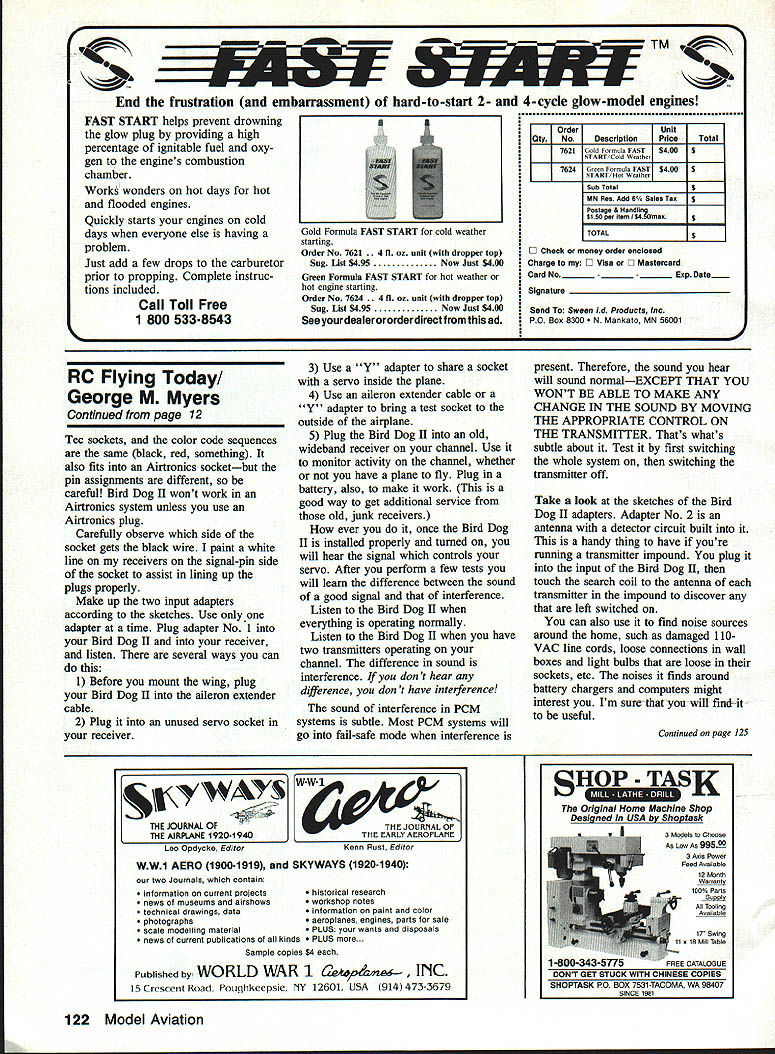
If the basic tests don't isolate the problem, consider a simple scanner such as a Bird Dog II or similar. No crystals are needed; a scanner will monitor the specific channel your receiver is on and will work with AM, FM, PCM, 27 MHz, the 72 MHz ham band, and some European frequencies.
Parts to build a Bird Dog II-style monitor:
- Palm-sized audio amplifier/speaker (Radio Shack Cat. No. 277-1008C, about $12)
- 9V battery (ask for the free battery when you buy the amplifier)
- Two 1/8-inch miniature phone plugs (Radio Shack Cat. No. 274-286A)
- High-frequency diodes (Radio Shack Cat. No. 276-1122)
- 5 pF capacitors (Radio Shack Cat. No. 272-120)
- Some wire
- A connector: cut the pigtail off a dead servo at the servo-plug end or cut off an aileron extender cable to make a receiver connector available.
Useful tip: a JR radio plug is an almost universal tool and will fit sockets such as the Futaba J socket. In-line and right-angle JR plugs fit well on late-model Aristocraft and Hi-Tec sockets. It also fits into an Airtronics socket physically, but pin assignments differ—be careful. Observe which side of the socket corresponds to the black (ground) wire; I paint a white line on my receivers on the signal-pin side of the socket to help line up plugs properly.
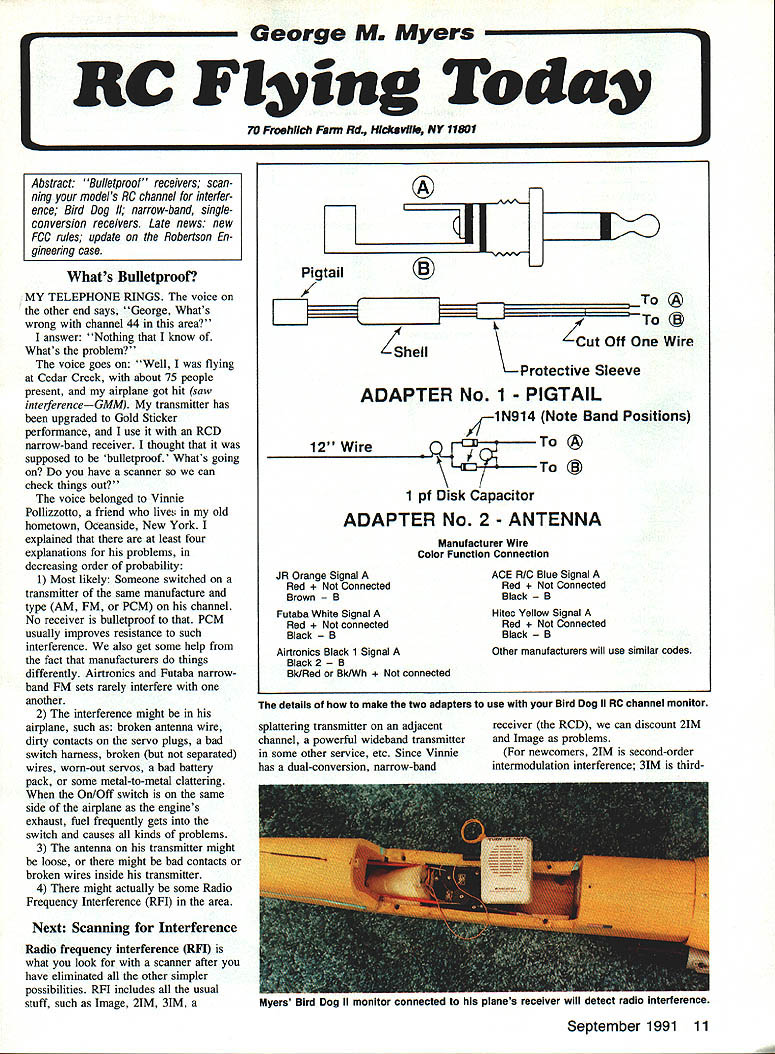
Make up two input adapters (as per the original Bird Dog II sketches). Use only one adapter at a time:
- Adapter No. 1: plugs between the Bird Dog II and your receiver to listen to the signal that controls your servo.
- Possible ways to connect:
- Before mounting the wing, plug the Bird Dog II into the aileron extender cable.
- Plug it into an unused servo socket in your receiver.
- Use a "Y" adapter to share a socket with a servo inside the plane.
- Use an extender or "Y" adapter to bring a test socket to the outside of the airplane.
- Plug the Bird Dog II into an old, wideband receiver on your channel (with a battery) to monitor channel activity even when you don't have a plane ready.
- Adapter No. 2: an antenna with a detector circuit built in (handy for searching around the impound or house). Plug it into the Bird Dog II input and touch the search coil to transmitter antennas in the impound to find anyone left switched on. You can also use it to locate noise sources at home—damaged 110 VAC cords, loose wall-socket connections, loose light bulbs, noisy battery chargers, or computer noise.
How to use the Bird Dog II:
- Listen when everything is operating normally to learn the baseline sound.
- Listen when two transmitters are operating on your channel; the difference in sound indicates interference.
- PCM interference can be subtle: many PCM systems go into failsafe mode when interference occurs. The audio may sound normal, but you won't be able to change the sound by moving the corresponding control on the transmitter. Test this by switching the receiver and transmitter off and on to identify the behavior.
After a few tests you'll learn the difference between a clean signal and interference.
Onward to Single-Conversion Receivers
Letter from Glen Roberts, Rocket City RC, Huntsville, Alabama: "Dear George, you say 'A narrow-band receiver, even if it is a single-conversion type like the JR ABC&W receiver, will not see any 2IM interference.' Ron Van Putte quotes Warren Plohr as saying, 'Receivers that are of the single-conversion superheterodyne type using a 455-kHz intermediate frequency are the cause for concern in reference to 2IM or 23-channels-apart interference.' I have Futaba R114H and R117H (single conversion) receivers which are listed as certified in the AMA news section of Model Aviation ..."
My answer: Old single-conversion 455-kHz receivers are suspect because many of them were wideband AM designs (which I call OWBAMS) and can be affected by various types of interference. In the new 50-channel environment, OWBAM receivers can see interference from transmitters 23 channel numbers away, which is called second-order intermodulation interference (2IM).
Dual-conversion receivers are naturally immune to in-band image and second-order intermodulation problems. Most—but not all—receivers certified to the AMA are dual-conversion designs.
A few new or redesigned single-conversion 455-kHz receivers (for example, some JR ABC&W FM receivers) have been engineered to minimize image (45- and 46-channel separation), second-order intermodulation (23-channel separation), and 20-kHz adjacent-channel (odd/even RC channels) interference.
The receivers reported to the AMA as meeting the AMA Guidelines for narrow-band performance are listed in the AMA News section of Model Aviation.
Futaba has submitted reports showing that new models of the R114 and R117 receivers deliver narrow-band and improved performance. As an example, I was racing electric hydroplanes recently on channels RC88 and RC89 and ran a system with a Gold Sticker transmitter and an R114H receiver without experiencing interference.
The earlier warning attributed to Warren Plohr was intended for people who continue to use OWBAM-type receivers.
Transcribed from original scans by AI. Minor OCR errors may remain.

