
For the Schneider Cup Reenactment: Timing and Scoring
TIMING — The first annual Schneider Cup Reenactment turned out to be easier than originally anticipated. The highly successful event was presented by the Desert Hawks Model Airplane Club in Lake Havasu City, AZ, in November 1989. In the speed-timing part of the competition each pilot attempted to fly his model at a target scale speed equal to the full-size Schneider raceplane speed multiplied by the model scale. A quarter-scale 1931 Supermarine S.6B, for example, would attempt to fly at one-fourth of the 340.1 mph flown by the British entry in 1931 — about 85 mph.
I was assigned the task of developing an accurate, foolproof method of determining model speeds for the competition. Our assistants tried a radar gun with no success: the models are fairly “stealthy” and produced little radar signature, and sitting in a boat directly in the path of giant-scale racing floatplanes at low altitude was unattractive. That idea was quickly abandoned.
The FAI Sporting Code provides a guideline for measuring model speed for world-record purposes: time the model over a 200-meter course in both directions and average the results. The practical problem is starting an electronic stopwatch the instant the model enters a 200-meter (about 600 ft) course and stopping it at the far end.
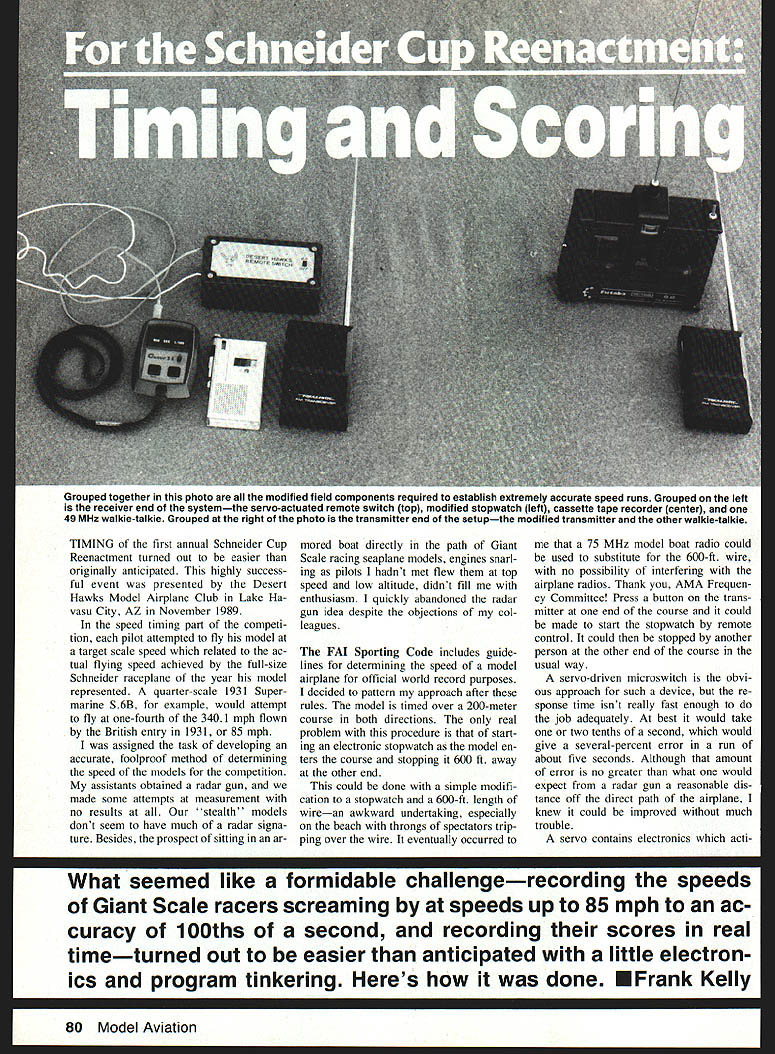
A direct wired solution (a 600-ft length of wire) is awkward on a crowded beach. It occurred to me that a 75 MHz model-boat transmitter could substitute for the wire with no possibility of interfering with airplane radios. Press a transmitter button at one end of the course to start a stopwatch remotely, and have another person at the other end stop it manually. A servo-driven microswitch is the obvious remote-switch approach, but servo response time (one or two tenths of a second) would produce several-percent error on runs of about five seconds. That could be improved.
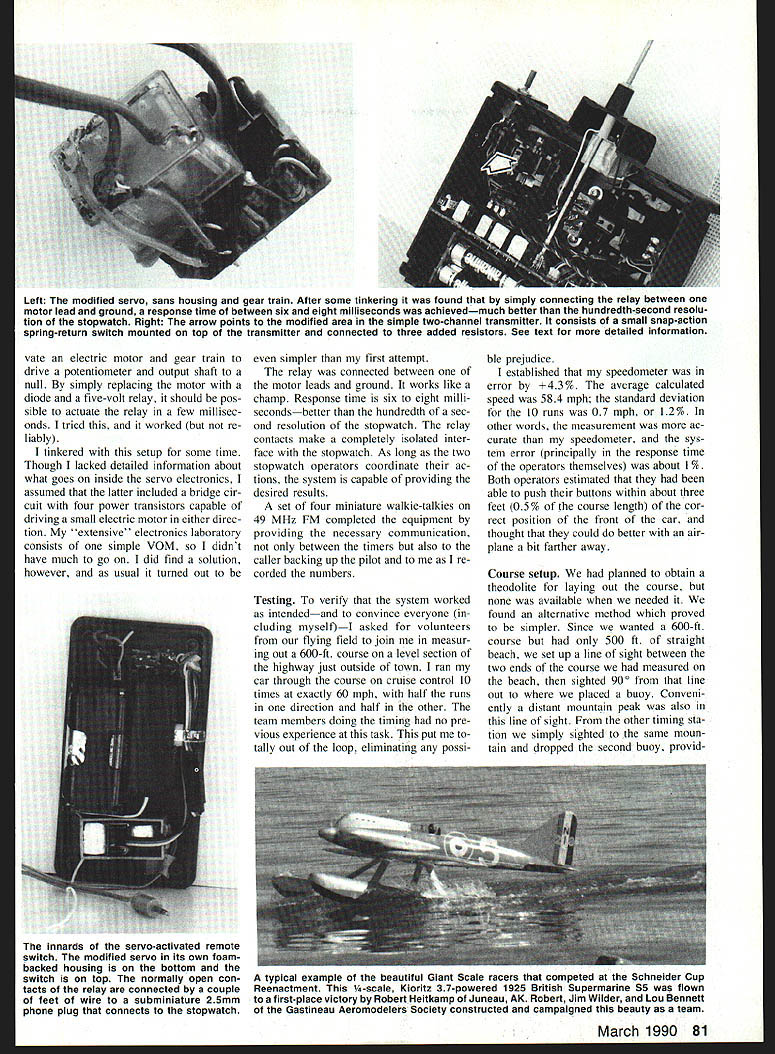
After tinkering, I discovered a simple, reliable modification: replace the servo motor diode with a five-volt relay (or connect a five-volt relay coil between one motor lead and ground). The relay actuates in a few milliseconds; in my tests response time was six to eight milliseconds — much better than the hundredth-second resolution of the stopwatch. Relay contacts provide a completely isolated interface to the stopwatch. With two stopwatch operators coordinating, the system provides the necessary accuracy. Four miniature walkie-talkies (49 MHz FM) provided communications between timers and the caller-back.
I also backed up the system with a second manual stopwatch and recorded the timers’ verbal “Ready … Mark!” on a microcassette recorder for possible later recovery. In practice the recorder was never needed, though I occasionally fell back to the manual stopwatch when an operator missed a button.
Testing
To verify the system and convince others I set up a 600-ft course on a level section of highway outside town. I ran my car through the course on cruise control 10 times at exactly 60 mph, with half the runs in each direction. The timers had no prior experience, which eliminated operator prejudice.
Results:
- Average calculated speed: 58.4 mph (the car speedometer read +4.3%).
- Standard deviation for 10 runs: 0.7 mph (1.2%).
- System error (primarily operator timing) was about 1%.
- Operators estimated they pressed the button within about three feet (0.5% of course length) of the correct location and expected to do better with an airplane slightly farther away.
Course setup
We had planned to use a theodolite for laying out the course but none was available. We used a simple optical method instead:
- Measure the two ends of the desired course on the beach (we wanted 600 ft but only had 500 ft of straight beach).
- From each end sight to a distant mountain peak and place a buoy along the 90° sight line so the two buoys formed nearly parallel lines of sight to the course ends.
- Adjust the program calculations to account for the shorter beach course where necessary.
Contest results
The real test was running the system in competition. We followed the FAI approach of averaging upwind and downwind legs. The stopwatch/relay system worked well; I recorded times, calculated speeds, and communicated results to callers on the walkie-talkies a few seconds after each pass. I had programmed a pocket calculator to compute miles per hour and percent of target speed from the time input.
At the end of the competition six of the ten contestants who completed time trials flew within 4% of their target speeds.
I used a second, manual stopwatch as backup and a microcassette recorder to record verbal timing calls, but playback was not needed except in a couple of cases where an operator missed a button.
Real-time scoring with a computer
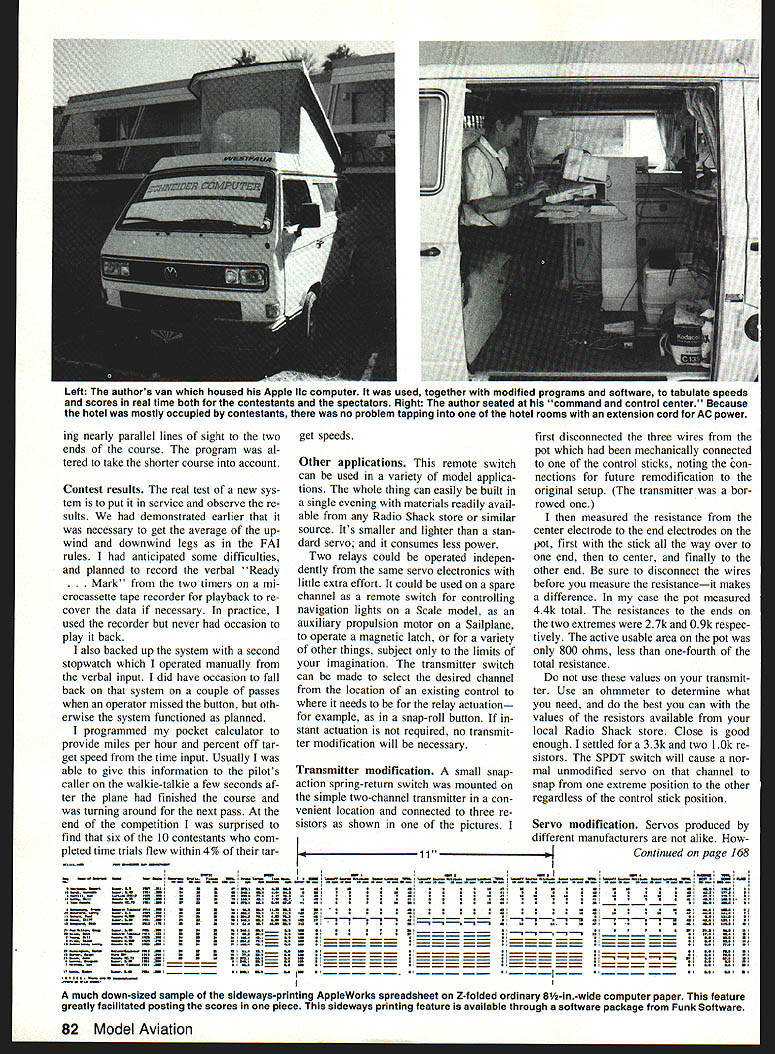
I wanted continuously available results for contestants and spectators. I used an Apple IIc running AppleWorks (spreadsheet) to capture judges’ scores and timing results and to compute the combined scores in real time.
Work flow:
- Set up spreadsheet columns with all required headings and equations.
- Enter equations and copy the first line to subsequent lines.
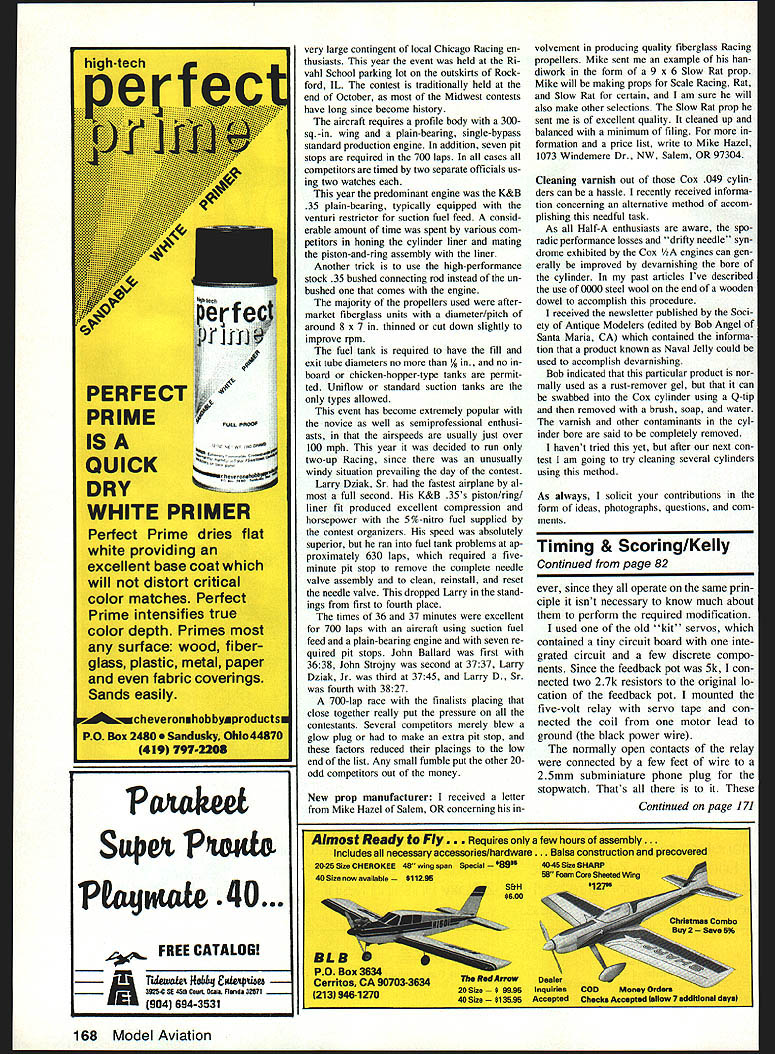
- Use a utility (Sideways) to print the spreadsheet sideways on Z-fold paper.
- Use Beagle Brothers’ MacroWorks to record macros for calculation, sorting, reformatting, and numbering places.
- Parked the computer and printer on the lawn with power from a hotel room; judges handed in score sheets immediately after each heat.
- The computer averaged judges’ inputs, retained all raw inputs on screen for recall, and printed updated place listings at intervals.
The system worked well; the only complaint was that the integers shown did not always add up exactly (rounding and suppressed decimals). I added a notice that the computer used full precision in calculations and only displayed limited decimal places. When it looked like a tie for first, I altered the total-points column to show one decimal place.
Other applications
The remote switch (modified servo) is small, light, consumes less power than a standard servo, and can be built in an evening with commonly available parts. Possible uses include:
- Remote switching of navigation lights on a scale model.
- Auxiliary propulsion motor on a sailplane.
- Operating a magnetic latch or other small devices.
- Any application using a spare radio channel as a remote switch.
Two relays can be operated independently from the same servo electronics with little extra effort. If instant actuation is not required, transmitter modification may not be necessary.
Transmitter modification
On a simple two-channel transmitter I mounted a small snap-action spring-return switch connected to three resistors. Steps:
- Note and disconnect the three wires from the potentiometer that was mechanically linked to one control stick (record the original connections for restoration).
- Measure the potentiometer resistances from center to ends with the stick in various positions (disconnect wires before measuring).
- Choose resistor values to mimic stick end positions. (Do not copy my numerical values blindly — measure your own pot.)
- I used a 3.3k and two 1.0k resistors from Radio Shack and an SPDT momentary switch. The switch forces an unmodified servo on that channel to snap to one extreme or the other regardless of stick position.
Servo modification
Servos vary by manufacturer, but inexpensive servos usually contain similar electronics. My approach:
- Use an old kit servo with a tiny circuit board and a 5k feedback potentiometer.
- Replace the feedback potentiometer function by connecting two 2.7k resistors where the pot had been.
- Mount a five-volt miniature relay (PC-board type) inside or on the servo using servo tape.
- Connect the relay coil between one motor lead and ground (black power wire). The relay contacts are routed via a few feet of wire to a 2.5 mm subminiature phone plug for the stopwatch interface.
- To prevent contact bounce from causing spurious stopwatch stops, install a 0.1 µF capacitor across the relay contacts.
- Consider adding a diode across the relay coil to suppress reverse spikes when the relay turns off.
- The battery, power switch, receiver, and modified servo can be mounted in a small project box to make a neat package; parts may fit into half a servo case in some builds.
Note: These relays have a tendency to bounce; the capacitor and diode are simple safeguards to prevent false stops.
Stopwatch modification
Most electronic stopwatches use a simple pushbutton that closes a contact to start/stop the quartz clock. Installing a subminiature phone jack in parallel with the pushbutton is a straightforward way to allow remote actuation by the relay contacts.
Parts list
Everything listed is available at Radio Shack (or equivalent suppliers):
- Servo modification:
- Two 4 W, loose-tolerance 2.7k resistors
- One five-volt miniature PC-board relay (Radio Shack part no. 275-247)
- Transmitter modification:
- Three 4 W, loose-tolerance resistors (I used one 3.3k and two 1.0k)
- One SPDT momentary switch (Radio Shack part no. 275-619)
- Miscellaneous:
- Blue plastic project box (Radio Shack part no. 270-222)
- 2.5 mm subminiature phone plug and wiring
- 0.1 µF capacitor; diode for relay coil
- Connectors, wiring, solder, mounting tape, etc.
Scoring
Scoring for the reenactment had three parts:
- Static judging using established AMA Sport Scale rules.
- Speed contest: pilots attempted to reproduce, in scale terms, the full-size prototype’s actual flying speed.
- Example: quarter-scale 1931 Supermarine S.6B target = 0.25 × 340.1 mph ≈ 85.0 mph.
- Example: 0.175-scale 1913 Deperdussin target = 0.175 × 61.4 ≈ 10.7 mph.
- Flight reenactment judged for realistic flight performance by an international panel of judges.
Because the scoring combined static scores, speed scores, and flight scores, a fair amount of numerical manipulation was required. I chose to perform all calculations in an AppleWorks spreadsheet and use macros to sort, format, and number places so up-to-the-minute standings could be printed and posted during the event.
Spreadsheet equations
Listed here are the significant spreadsheet equations used (cell references reflect the original layout; replace with your layout as needed):
- Static total (I8)
- Formula: (G8+H8+I8)
- Interpretation: Sum of static judging components.
- Target speed, mph (M8)
- Formula: (L8*E8)
- Interpretation: Prototype actual speed (L8) × model scale (E8).
- Measured speed, mph (O8)
- Formula: @IF(N8>0,(340.9/N8),0)
- Interpretation: If the time in N8 is greater than zero, compute 340.9 ÷ N8 (340.9 divided by seconds over a 500-ft course gives mph). Otherwise enter 0.
- Speed error, percent (P8)
- Formula: @IF(N8>0,(100*((O8-M8)/M8)),100)
- Interpretation: If N8 > 0, compute 100 × (O8 − M8) ÷ M8. Otherwise enter 100 as a placeholder.
- Speed score (Q8)
- Formula: @IF(ABS(P8)<50,(50-(0.6*(ABS(P8)))),0)
- Interpretation: If absolute speed error is under 50%, score = 50 − 0.6 × |P8|. If speed error ≥ 50%, score = 0.
- Flight score, Heat 1 (X8)
- Formula: @SUM(S8:W8)
- Interpretation: Sum judges’ flight scores for Heat 1.
- Flight score, Heat 2 (AE8)
- Formula: @SUM(AN8:AR8)
- Interpretation: Sum judges’ flight scores for Heat 2.
- Flight score, Heat 3 (AL8)
- Formula: @SUM(AG8:AK8)
- Interpretation: Sum judges’ flight scores for Heat 3.
- Flight score, Heat 4 (AS8)
- Formula: @SUM(AN8:AR8)
- Interpretation: Sum judges’ flight scores for Heat 4.
- Average, best 3 heats (AU8)
- Formula: (X8 + AE8 + AL8 + AS8 - @MIN(X8,AE8,AL8,AS8))/3
- Interpretation: Sum the four heat scores, subtract the lowest, divide by 3.
- Total score (AW8)
- Formula: (J8 + Q8 + AU8)
- Interpretation: Static score + Speed score + Flight score.
Macros
I created custom macros in AppleWorks (with MacroWorks) to automate calculation, sorting, spacing, and labeling. Key macros:
- Macro B: Sort scores, high at top.
- Sequence: (oa-A)(oa-9)(rtn)4(rtn)1
- Comment: Start at AW8, execute open-Apple-A (arrange/sort), open-Apple-9 (EOF), choose numerical sort (highest first).
- Macro E: Insert blank row every five entries for readability.
- Sequence: (down)(down)(down)(down)(down)(oa-1)R1(rtn)(down)(down)(down)(down)(oa-1)R1
- Comment: Starting at AW8, move down five rows and insert a row, repeat as needed.
- Macro F: Find cell AW8.
- Sequence: (oa-F)(oa-Y)A8(rtn)
- Comment: Uses Find and coordinates to locate cell AW8.
- Macro G: Static judging entry (Column G).
- Sequence: 1(rtn)(11+22)/2(rtn)(oa-L)EVF0(rtn)(oa-U)(right)
- Comment: Sets up averaging equation (11+22)/2 and prepares display formatting.
- Macro N: Speed entry (Column N).
- Sequence: 1(rtn)(11+222)/200(rtn)(oa-L)EVF2(rtn)(oa-U)(right)
- Comment: Prepares field for entering seconds and hundredths (three-digit input without decimal) and formats appropriately.
- Macro S: (partial from original)
- Sequence begins: (oa-F)(oa-Y)A8(rtn)(oa-B)B(oa-9)(rtn)1(down)2(down)
- Comment: (truncated in source) likely part of sorting/formatting sequence.
Note: The macros referenced the “solid-Apple” key (open-Apple, denoted oa or sa) used as a control key in Apple II. Adjust macros to your version of AppleWorks or equivalent spreadsheet software.
---
As always, contributions in the form of ideas, photographs, questions, and comments are welcome.
Transcribed from original scans by AI. Minor OCR errors may remain.

